How to build Reader's Web
At first glance, Reader's Web may seem like something that would require new browser features and years of standardization work. But it doesn't.
We can start building Reader's Web today without waiting for browser vendors to support its document formats. In this article, I'll explain how.
Sub-webs
The Web is a collection of all web pages. Originally, it consisted only of HTML pages. Over time, other document types were added. For example, PDF documents. A PDF document behaves like a web page: it can be viewed in a browser, and it can contain clickable links. Another document that behaves similarly is a standalone SVG image.
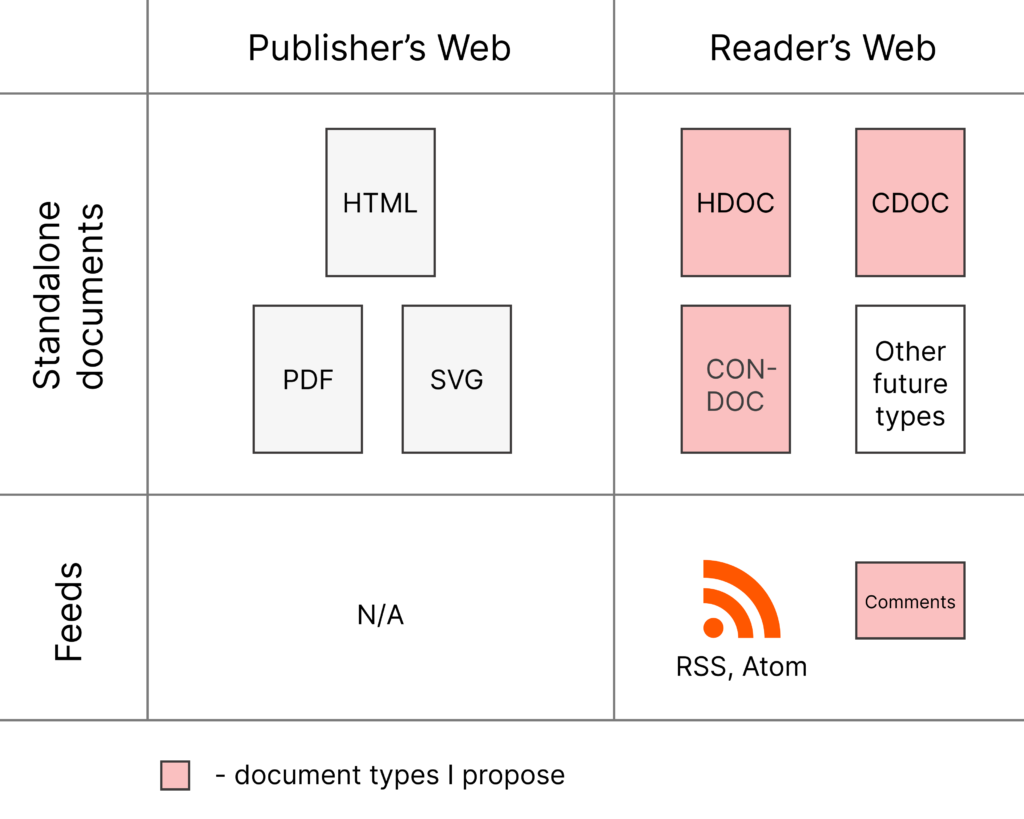
HTML, PDF, and SVG documents may contain scripts, so they can behave like applications. Each of them is an isolated container. Each of them has its own styles. The reason we haven't seen visible connections on the Web so far is because you can't really draw visible connections between such pages because their styling is unpredictable.
A collection of documents of a particular type can be called a sub-web. We can talk about a "PDF sub-web" or an "SVG sub-web," although such terms are not particularly useful.
More interesting are the sub-webs we can create on the Reader's Web. I call them static sub-webs because documents on the Reader's Web are static—that is, they don't contain scripts. Currently, the Reader's Web includes the following document types:
- HDOC (an HTML-based document containing an article)
- CDOC (SVG-based collage document)
- CONDOC (a connections document that allows the main document to be loaded from another URL)
- Static comments (a JSON feed of comments that can be used in HDOCs)
In the future, other document types may be added—for example, timelines or walkable 3D scenes. You can turn almost any application into a web of documents.
Since in this article we are exploring how to build a sub-web, we don't need to look into every document type that currently exists or may be added in the future. So, in this article I will focus only on HDOCs, using them to illustrate how sub-webs can be constructed.
Recipe for creating a static sub-web
Anybody can create sub-webs. The question is: once you create a new document type, how do you get browsers to support it? It turns out that you don't have to.
There is a way to introduce a new document type and popularize it on the Web without browsers explicitly supporting it. If it becomes popular enough, browsers may eventually start supporting it directly. But that support is not strictly necessary for the document type to be useful.
Let me explain how it can be done using HDOC as an example.
Step 1. Define the document type
Define the new document type as if you expect browsers to support it. Now you have the document, but browsers don't know how to render it.
Step 2. Create a client app
Create a client application—preferably a browser extension. You could create your own browser, but it's much easier to create an extension focused on supporting the new document type while letting the existing browser handle everything else. It's also easier to convince people to install an extension than to switch to a new browser.
Now people with the extension can view HDOCs. The problem is that they are a tiny minority of all browser users. Most people don't have the extension installed, so when they open an HDOC they'll only see its source code. What's worse, website owners will be reluctant to publish such documents because they won't be readable for most visitors.
Step 3. Define an embedded version
Define an additional, hybrid version of the document. I call it an Embedded HDOC because it is embedded in a normal HTML page.
Of course, you don't simply add an entire HDOC containing the same content to an existing HTML page. Instead, you annotate the content of the HTML page and store all the additional information in JSON format. This allows the same URL to serve both formats. People with the extension installed will see an HDOC. Everybody else will see the original HTML page.
So, we no longer have pages that appear as raw source code to most people.
That leaves only one problem. If you, as a website owner, use new features such as visible connections, they'll be available only to people who have installed the extension. That means you'd have to tell your readers something like:
"To see the visible connections on this page, you need to install this browser extension."
For many website owners, that may be a deal breaker.
Step 4. Serve Reader UI from your server
Instead of relying solely on the browser extension, websites can serve the Reader UI themselves. This way, everyone gets the full functionality without being asked to install additional software.
Such a page should also contain an Embedded HDOC in case someone wants to use the extension or load the page as a connected document next to another document.
In the end, all you need is a browser extension and some server-side code.
For HDOCs, the extension can be downloaded here. As for the server-side code, I've developed a WordPress plugin that you can find here.
Circumventing browser restrictions
On the Reader's Web, you can connect pages to other pages and display visible connections between specific parts of their content. That means the main page must be able to request the connected page.
If the connected page is hosted on another website, you can't request it directly because browsers block such cross-origin requests. There are a couple of ways to work around that restriction.
With the browser extension, you route the request through a background script. The background script is exempt from the browser's cross-origin restrictions. You do, however, need to take measures to prevent a malicious web page from hijacking the background script which I have already done in my extension.
When the Reader UI is served from the server and the extension is not used, you can instead use a proxy endpoint to forward requests to other websites.
In that case, you need to make sure that other people can't use your endpoint as a tunnel to request arbitrary URLs. In my plugin, the frontend sends not only the target URL but also the URL of the current page. The server then checks whether the current page lists the target URL among its outgoing connections. Only if it does is the request forwarded to the other website.
Is it safe?
Circumventing browser restrictions may seem dangerous. After all, those restrictions exist for a reason.
In this case, however, we can make it safe.
Browsers restrict scripts from reading data from other websites because those scripts are written by unknown authors and cannot be trusted to make requests on your behalf or access information from other origins.
An HDOC, however, contains no scripts. The code that renders it is trusted code. Today, that code is provided by the browser extension. In the future, it could be built directly into the browser itself.
The safety of this approach therefore depends on how thoroughly the document content is sanitized before it is rendered. I have designed both the browser extension and the WordPress plugin with security in mind and have made them as safe as possible to the best of my knowledge. As with any software, if security issues are discovered, they can be addressed in future updates.
Server plugin
Some document types, such as HDOC and Embedded HDOC, can be created manually and published as files on any website. However, server plugins can make adopting these new document formats much easier.
Currently, there is one such plugin for WordPress sites: Static Web Publisher. It allows you to serve your existing pages as hybrid pages. If a visitor has the browser extension installed, those pages are automatically rendered as HDOCs. Otherwise, visitors see the original HTML pages.
Alternatively, you can serve your pages with Reader UI. In that case, everyone gets the Reader's Web experience, regardless of whether they have the browser extension installed.
Everybody gets what they want
This approach gives everyone exactly what they need.
A reader only has to install the browser extension to get the full Reader's Web experience, including the ability to configure the theme for all supported documents.
A website owner who uses visible connections wants to be sure that everyone will see those connections, regardless of whether they have the browser extension installed. Serving the Reader UI from the server makes that possible.
And if a website owner simply likes the main idea of the Reader's Web and wants to delegate the choice of the website's theme to the reader, they can enable an option in the Reader UI that displays an informational popup explaining the Reader's Web. Readers who find the idea interesting can then install the extension.
To readers who aren't familiar with the Reader's Web, it will simply look as though many unrelated websites happen to use the same theme. Until browsers start supporting the Reader's Web natively, you have to use some theme on your website whether you like it or not.
Who can create static sub-webs?
Because browser support is not required, anybody can define new document types and use the above "recipe" to create static sub-webs.
You can turn any app into a web of documents. Take for example this web app that shows historical events on an interactive timeline. Here is a video that shows the timeline in action.
The timeline, with its navigation, can be moved to a browser extension and a server plugin. A couple of web page document types can be defined for folders and layers of historical events. Currently, that information comes from the website's database, but it can come from documents published on many different websites.
And you can do so with almost any app. You just need to find a use case where turning an app into a web of documents makes sense. We don't need to be too cautious. You can think of it as throwing things at a wall to see what sticks. Some of those document formats may become popular enough that eventually browsers may start supporting them directly. But even if that never happens, it doesn't necessarily mean that those particular document types have "failed." You can have niche sub-webs that are useful for some people but are never directly supported by browsers.
What about browser support?
While we don't require browser support for the new document formats, we actually do want browsers to start supporting them at some point in the future. It will simplify a lot of things.
For example, website owners won't need proxy endpoints to circumvent browser restrictions when downloading a connected document from another website. That will make requests much faster, and the owners of the websites you request connected pages from will see your information in their analytics instead of the proxy server's.
The browser extension won't be needed anymore.
Server-side code will be simplified because you won't need to serve the Reader UI from the server anymore.
In the future, "forced" versions of embedded documents will become obsolete as well.
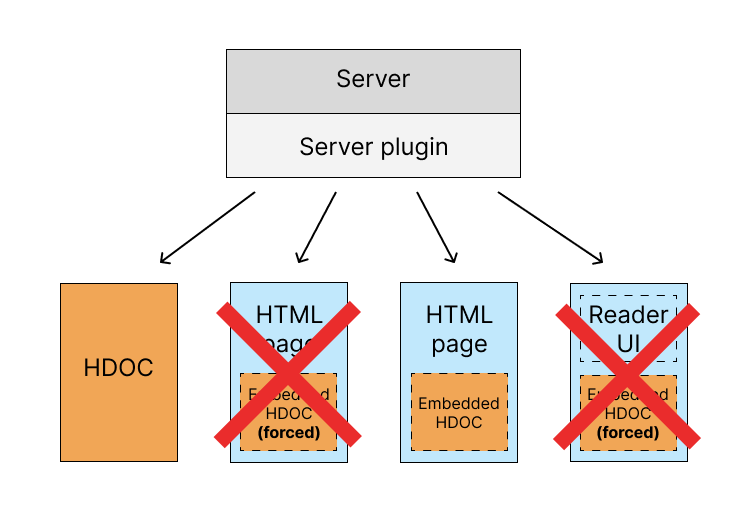
Around the time browsers start supporting Reader's Web, content management systems like WordPress may start supporting it as well. At some point, you won't need a server plugin or any special software at all. HDOC will become a first-class citizen of the Web.
But for all of that to happen, we need all mainstream browsers to support Reader's Web. Not some of them. Not most of them. All of them. If there is a noticeable percentage of people who can't view standalone HDOCs because their browsers don't support them, website owners will not start switching to standalone HDOCs and will continue using Embedded HDOCs and the Reader UI. And for any browser company that goes through the trouble of implementing support for Reader's Web, it may seem that they have just wasted their resources on something pointless because nobody uses HDOC — the document format they have just started supporting.
So achieving native browser support of Reader's Web document formats is tricky. But the good news is that, as I said earlier, while we do want browsers to support Reader's Web, we don't need that support.
If you focus on functionality, you will see that browser support won't add any new functionality. If there is any functionality you think is missing from Reader's Web, we can add it. Browser support will make things simpler, faster, and cleaner. But it won't add any functionality that we can't add ourselves.
Problems we don't need to worry about
If you want to have a blog without having to worry about its design, or if you want to use visible connections between documents, it shouldn't matter to you how popular or unpopular Reader's Web currently is.
The "network effect" is not important for the adoption of Reader's Web document formats. It is important in other scenarios. For example, if you start a brand-new social media platform, you may fail to get enough users simply because people don't want to join an empty social network.
This is not the case with Reader's Web. For a website owner, Reader's Web is all about the new functionality it provides. And when you install all the required software, you get that functionality regardless of how many websites support Reader's Web document formats.
What we still need to work on
Reader's Web is by no means a finished project. Just as the World Wide Web has continued to evolve throughout its history, Reader's Web will evolve as well. After revising the document formats several times, I believe they have now reached a stable foundation. Future changes should be additive rather than breaking existing documents.
Here are a few areas I plan to work on as time permits.
Coverage
We have a WordPress plugin, but we don't yet have plugins for other content management systems. That's not a conceptual problem. It's not that we don't know what to do, and it doesn't require permission from browser vendors. It's simply a matter of doing the work.
Once I see traction with the software we currently have, I plan to build similar tools for other platforms, not just WordPress.
Features for blogging
HDOCs should eventually support most of the features available in a typical WordPress blog. For example, why not support categories?
What if someone wants to build an entire website using HDOCs? Today, some pages—such as search results—still have to be regular HTML pages. Perhaps a dedicated static document format should be introduced for those pages. Maybe several formats. The goal is to allow an entire website to be presented consistently using Reader's Web document formats.
Richer connections
Visible connections are currently one-to-one. They could be extended to support many-to-many relationships.
Today, a connection ends with a dot on the collage side. Other endpoint types could be introduced. What if you want to connect to an entire rectangular region instead of a single point? Or attach annotations or small information popups? These are examples of features that could be added over time.
Testing
Reader's Web is a fairly complex project. In many ways, it is like building a browser from scratch. You would therefore expect it to have a comprehensive test suite. At the moment, that is not the case. My priority has been implementing the core functionality, leaving less time for automated testing.
As more people begin using the software, I expect bugs and edge cases to surface. My goal is to stabilize the project by adding comprehensive tests and creating a corpus of test documents that any Reader's-Web-compatible client can use for compatibility testing.
Future features
Reader's Web is inspired by Ted Nelson's Project Xanadu. So far, I have focused on features that can be implemented on today's Web, such as visible connections between documents. Over time, additional ideas inspired by Project Xanadu—such as stabilized content addresses, transclusion, and other capabilities—may be added as well. I made a video about it.