Author: Karen

  • CONNECTIONS format description

    HDOC, CDOC and SDOC may all have <connections> section. It contains a list of documents the current document wants to connect to. Each connection may have a set of floating links.

    Child Element: <doc> (multiple)

    Contains information about a document.

    Attributes:

    • title (optional): Connected document’s title
    • url (required): Connected document’s url
    • hash (optional): SHA256 hash of the connected document’s content.
      • HDOC: Hash is calculated over textContent, not the HTML or innerText (to avoid whitespace modifications affecting highlight indices).
      • CDOC: Hash covers the entire <svg> section, including the <svg> tag.
      • Currently, the hash is generated upon export but is not verified when loading documents. This feature will be added later.

    Child Elements of <doc>

    A <doc> may contain floating links, which link:

    • Text segments in HDOCs
    • Points in collages (CDOCs)
    • Points in 3D scenes (SDOCs, not supported currently)

    Floating links are presented as lines with key value pairs. Examples:

    i:6771;l:22;h:abb7b7;e:MjE=_i:35;l:22
    i:7494;l:34;h:7ac799;e:TzI=_i:59;l:28;h:3fa088
    
    i:611629;l:149;h:f01591;e:VGw=_p|x:31.166;y:209.243;r:0.297
    i:238781;hi:238774;l:12;hl:19;h:858f4c;e:dmE=_p|x:45.462;y:218.567;r:0.209

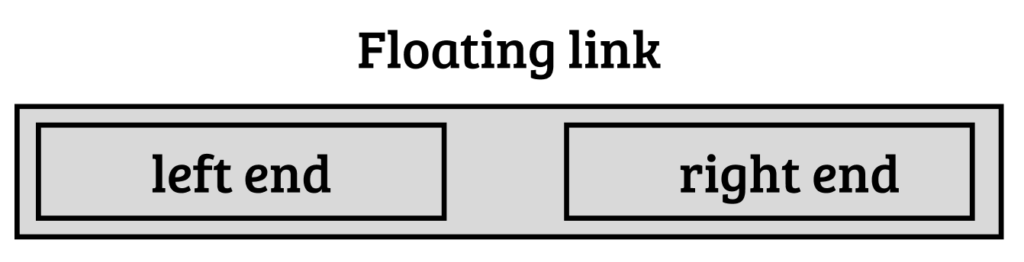
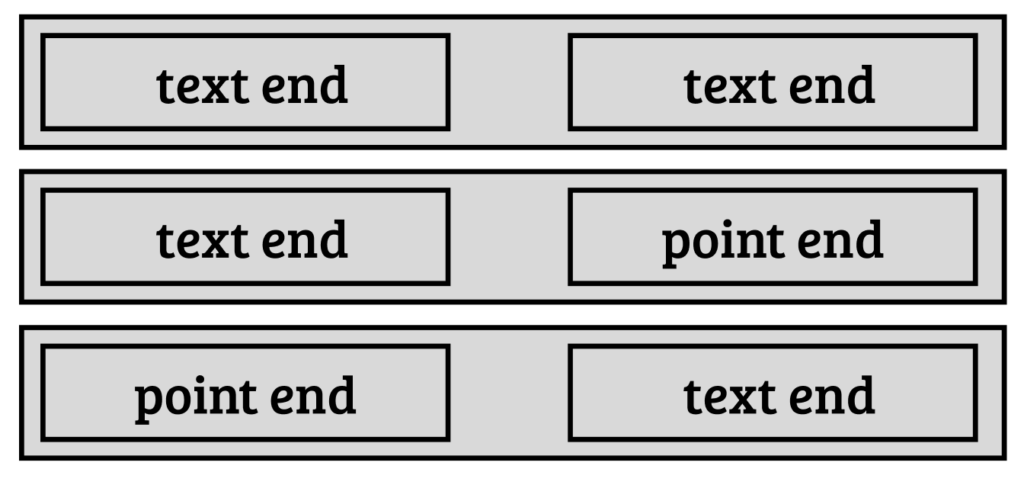
    A floating link has two ends:

    What end you use, depends on the document. For text documents you use a text end, for collages – a point end. There may be different combinations.

    Point-to-point links, for visible connections between two collages, are currently not supported but may be supported in the future.

    Two parts of a floating link are divided by an underscore.

    Point end

    Example:

    p|x:45.462;y:218.567;r:0.209
    • p → Point end type
    • x, y → 2D coordinates in a collage
    • r → Radius of a visible marker

    Text end

    Example:

    t|i:47703;l:33;h:c85272;e:QTI=
    • t → Text end type (default, can be omitted)
    • i → Index of the first character of the highlighted text
    • l → Length of the highlighted text
    • hi → Index of hashed range
    • hl → Length of hashed range
    • h → SHA256 hash
    • e → Ends of hashed range (first and last letter of hashed range concatinated into one string and then base64 encoded)

    Most text ends will appear without the t prefix:

    i:47703;l:33;h:c85272;e:QTI=

    Hashes in text ends

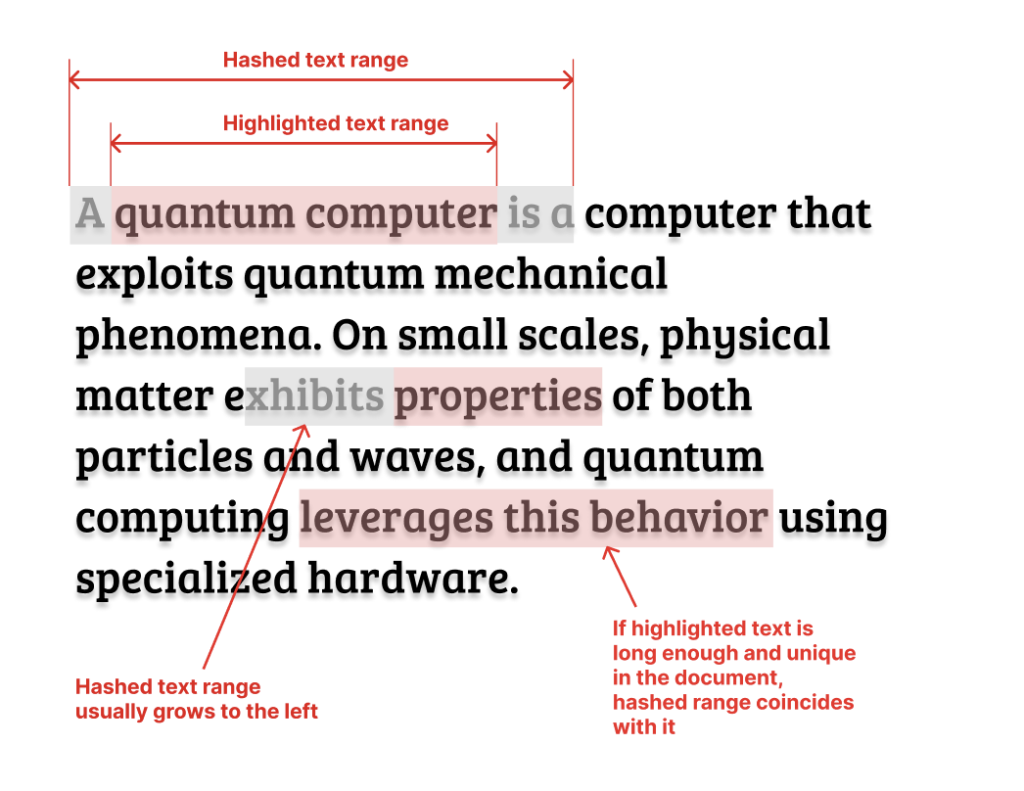
    Hashes are used, so we could tell if the link is broken because the text of a document was changed. And if the link is broken, in many cases the hash can help fix it by moving it to another index. The client app can simply move a range of a known length across the text and check at each tested index if the hash of a text within that range matches the known hash.

    • Hashes are generated for text segments that are unique and at least 10 characters long (character limit is used by LZ Desktop app when creating floating links, but it is not a requirement that will be set as a Web standard that all client apps must follow).
    • If highlighted text is too short or non-unique, the hash is computed for a larger surrounding range.
    • Default behavior: The hashed range extends left unless near the start of the document, in which case it can grow right as well.

    When the highlighted text is both long enough and unique, the hashed range coincides with it, making hi and hl unnecessary:

    i:6771;l:22;h:abb7b7;e:MjE=

    For text-to-text links, if both ends have the same hash, the second hash can be omitted. If the hashed range ends are the same (regardless of whether the hashes are the same or not) the “e” in the second text end can be omitted as well:

    i:6771;l:22;h:abb7b7;e:MjE=_i:35;l:22

    Ends of hashed range are stored so that if the link is ever broken, it can be fixed in a reasonable time. If you only use hashes, you may have to test a large number of positions in text by calculating hash for each of them. If the web page is a size of a book, it can take, for example, 30 seconds or even a minute to fix all broken links.

    If you know the first and last letter of the hashed string, you don’t need to check all possible positions, but only the ones where the first and the last letter match those stored in “e”. Because of that, the links with “e” parts can be fixed almost instantly.

    How this format can be extended

    I have only implemented floating links for the simplest possible use cases. In the future a lot more options can be added.

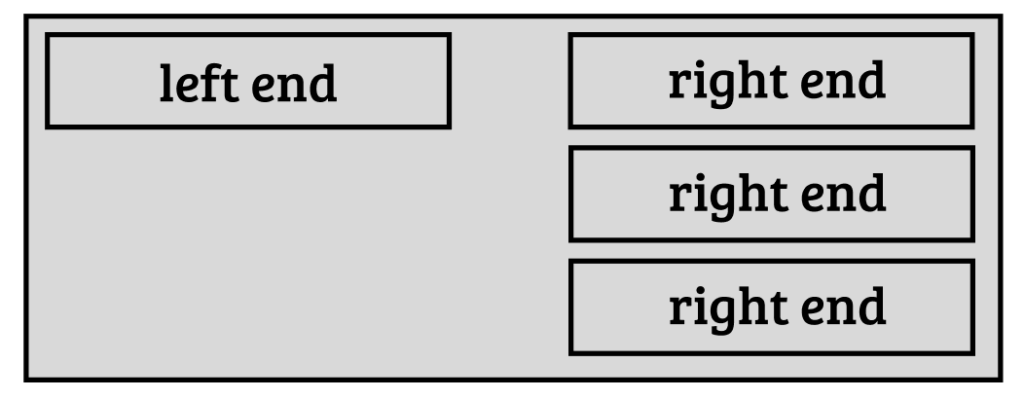
    We may want to be able to have multiple ends for one floating link. For example, you may want to create one commentary that is connected to multiple places in another document.

    We may need to distinguish different types of links. So, a type field can be added to floating links.

    Types can be, for example, Reference Link, Commentary Link, Correction Link, and many others. Some links may not even be links between two documents, but simply annotations within one document.

    New floating link ends

    For CDOCs (2D collages) a lot more link ends can be added besides a simple point marker. For example, you may want to frame something with a rectangle. You may want to add texts as overlays. All such cases can be handled by introducing new floating link ends.

    A collage may contain texts, so maybe we should be able to have text ends that are used in collages.

    Also, it may be useful to be able to target specific images within a collage instead of using absolute coordinates. This way, if an image position was changed, the link will not be broken.

    In 3D scenes (SDOCs) a support for 3D point ends and possibly other types of ends may be added in the future.

    Proper Xanalinks

    As I mentioned in other posts, this project is inspired by Ted Nelson’s project Xanadu. In Xanadu, there was a completely different mechanism for stabilising content of documents, so that links are never broken. That mechanism can be used in the Web 1.1 as well. It probably won’t be widespread, but I think it should exist as an option.

    Documents that support that mechanism, will be simply HDOCs that have an <edl> section.

    A new floating link end will be introduced for Xanalinks. It will be more complex than a regular text end with a hash.

    Because it’s just one end, it can be combined with other types of ends. So, you’ll be able to connect a Xanadoc (HDOC with an EDL section) to a regular HDOC. Or to a collage, 3D scene, or another Xanadoc.

    If for whatever reason you don’t want to use stabilized content addresses from EDL you’ll be able to use a simple text end over a Xanadoc. But in this case you won’t be using all the features a Xanadoc can provide.

    An example of an HDOC with CONNECTIONS section:

    <hdoc>
    <content>
    Content of the document...
    </content>
    <connections>
    
       <doc url="https://example.com/dates" title="Dates" hash="d79712">
          i:6771;l:22;h:abb7b7;e:MjE=_i:35;l:22
          i:7494;l:34;h:7ac799;e:TzI=_i:59;l:28;h:3fa088
          i:47703;l:33;h:c85272;e:QTI=_i:116;l:27;h:8de52f
       </doc>
    
       <doc url="https://example.com/collage" title="Collage" hash="54dfa4">
    i:611629;l:149;h:f01591;e:VGw=_p|x:31.166;y:209.243;r:0.297
    i:238781;hi:238774;l:12;hl:19;h:858f4c;e:dmE=_p|x:45.462;y:218.567;r:0.209
       </doc>
    
    </connections>
    </hdoc>
  • The Three Stages of Web Evolution

    The way I have presented Web 1.1 so far might make it seem like it’s all about saving documents locally in spatial environments. But that’s not the whole picture.

    The new proposed data types – HDOC, CDOC, and SDOC – can be used anywhere. Specifically, they can function within a regular browser, inside tabs. These data types are just special types of web pages.

    If all goes well, I plan to develop the first Web 1.1-compatible browser this year. However, this is only a small step and not an urgent one, since there isn’t yet enough Web 1.1 content to necessitate a dedicated browser.

    For now, we can use Web 2 for navigation and discovery, and Web 1.1 will be used for saving. But that’s a temporary arrangement.

    The Big Goal

    Ultimately, the aim is to encourage mainstream browsers to support Web 1.1 data types. The way to achieve this is by making Web 1.1 widespread on existing websites first.

    Initially, Web 1.1 will require a special app like LZ Desktop for saving documents in spatial environments. Not many people will use such apps, as many don’t even own personal computers. But that’s not a problem. Websites may still support Web 1.1 to accommodate those few who want to use Static Web.

    I’ve discussed incentives for website owners to support Web 1.1 in another post.

    What to expect in the future

    As more websites adopt Web 1.1, mainstream browsers will have more reasons to support its data formats—just as they currently support viewing PDFs. Eventually, they could support HDOCs, CDOCs, and SDOCs, even displaying visible connections between them.

    Once Web 1.1 documents can be used in regular browsers, search engines may start indexing them, just as they do with HTML pages and PDFs.

    A New Type of Website

    With browser and search engine support, Web 1.1 documents will become first-class citizens of the web. You’ll be able to build an entire website using only these new data types, without any traditional HTML pages.

    Technically, you could do this right now, but it wouldn’t be practical without browser and search engine support—most users wouldn’t be able to find or view your content.

    The Three Stages of Web’s Evolution

    I like to compare this transformation to the lifecycle of a butterfly. Why? Because just as a butterfly looks nothing like its initial form—a caterpillar—the Static Web, in its final form, will be vastly different from what it is today. So, the three stages of the web’s evolution can be named:

    1. Caterpillar
    2. Pupa
    3. Butterfly

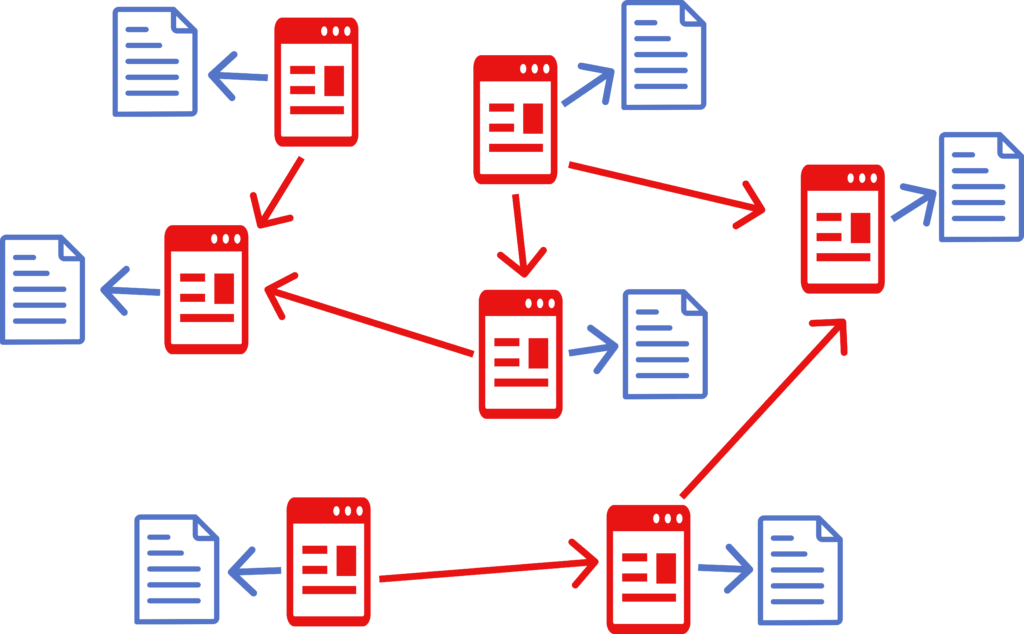
    Caterpillar Stage (Current Phase)

    At this stage, Web 1.1 is used only for saving content. Navigation and discovery still rely on Web 2 pages and traditional browsers.

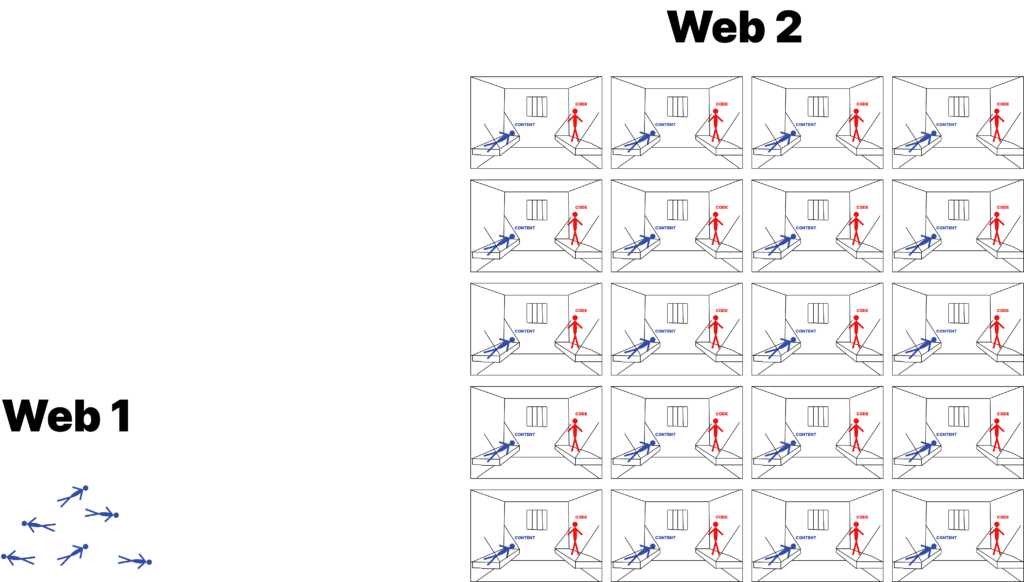
    On Caterpillar stage a lot of regular web pages (red) get alternative static versions (blue) that you can save

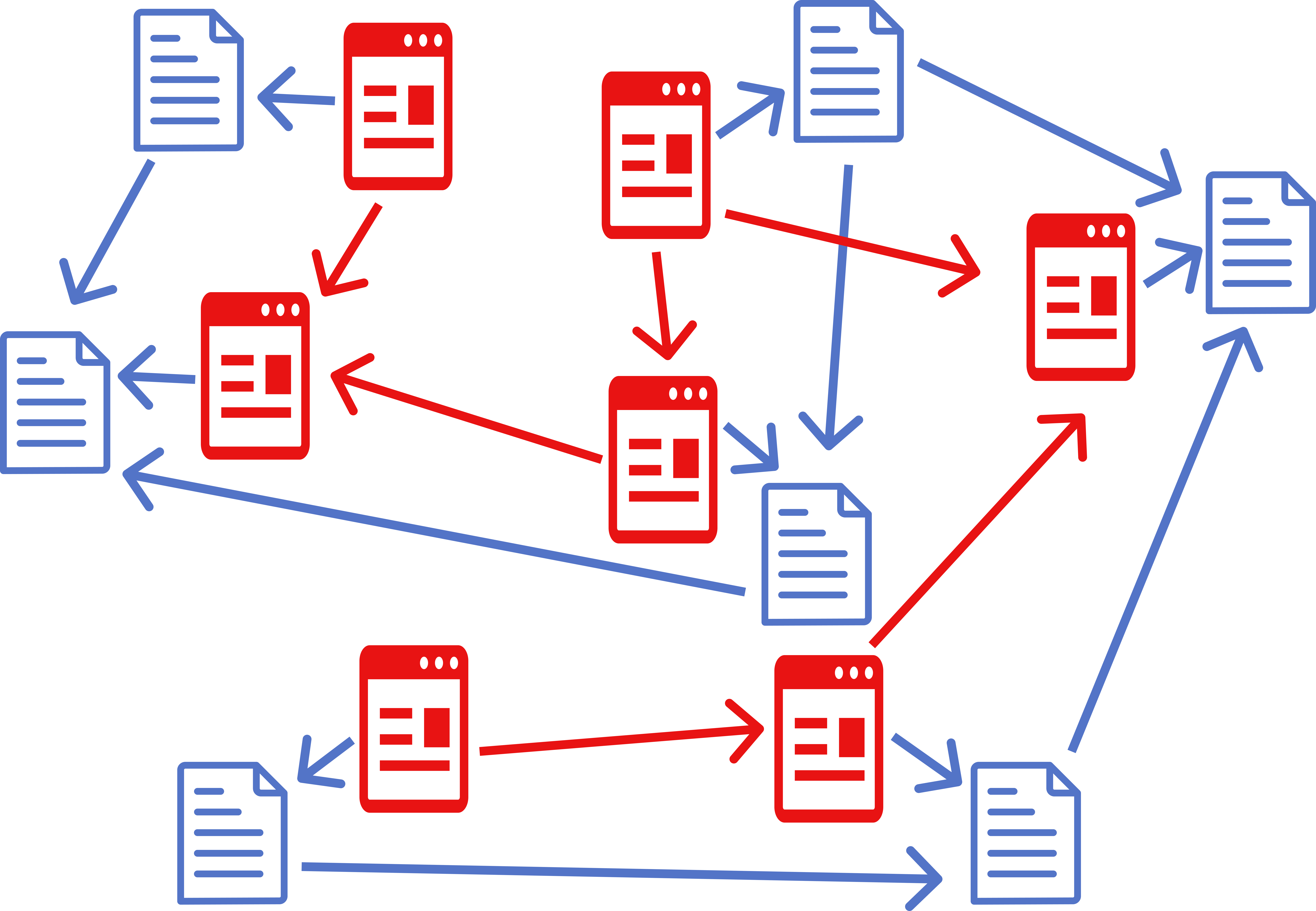
    Pupa Stage

    This stage begins when mainstream browsers start supporting Web 1.1 data types. Users will then be able to navigate both Web 1.1 and Web 2 within their browsers. However, website owners will still need to maintain Web 2 versions, as many users will continue using browsers that don’t yet support Web 1.1.

    On Pupa stage you have two Webs which you can freely navigate in your browser. There is a lot of duplication, but you have to keep old versions for now.

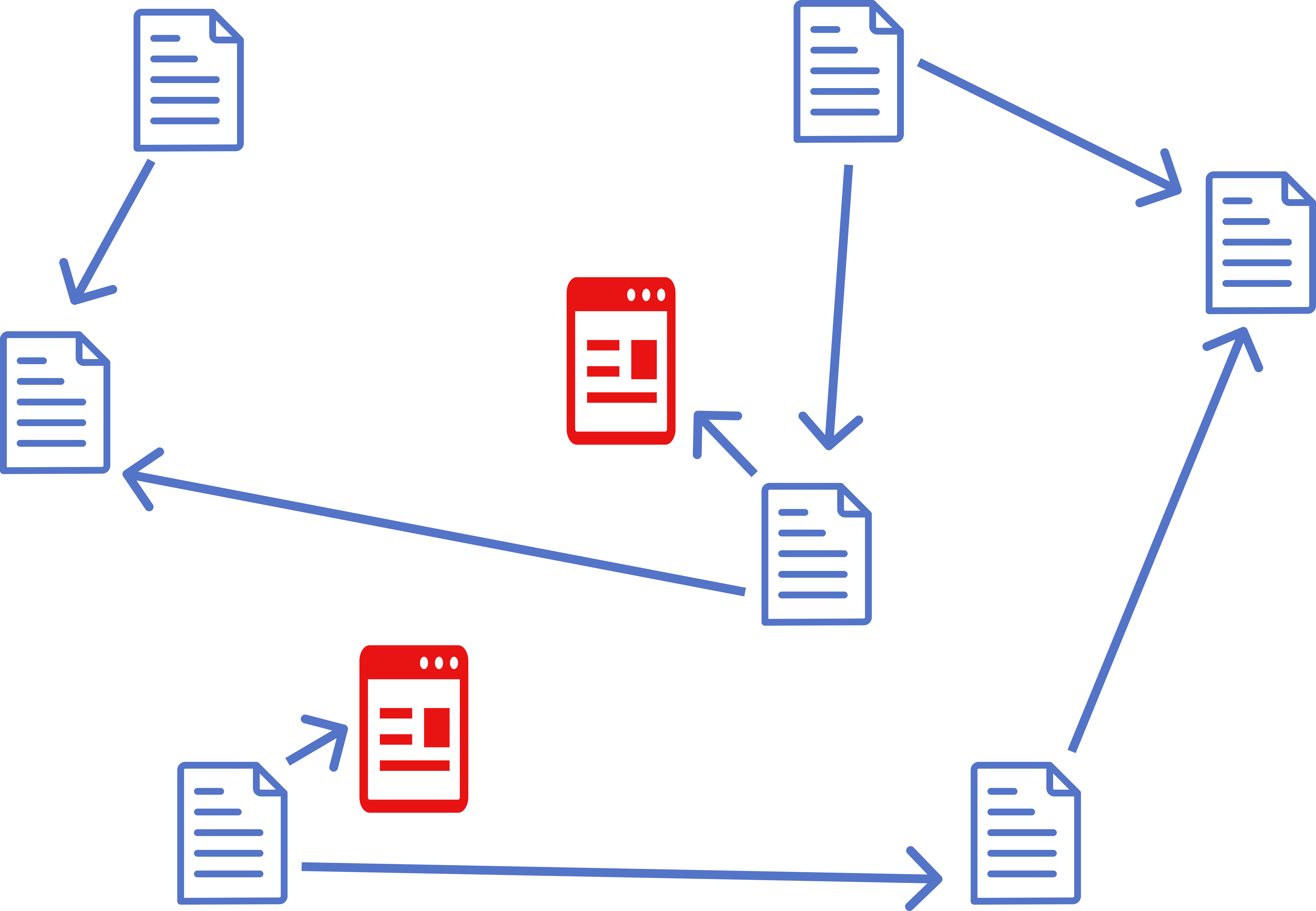
    Butterfly Stage

    This final stage begins when all major browsers and search engines fully support Web 1.1. On this stage you can remove Web 2 pages from your website and replace them with redirects to Web 1.1 versions of the same pages. Web 2 will shrink.

    On Butterfly stage old web (Web 2) shrinks. Web is mostly made of static documents.

    Timeline for Transformation

    I don’t know how long this transition will take. It could fail early on if Web 1.1 doesn’t gain momentum. But since there’s no limit on retries, we can keep pushing forward.

    If we manage to get a critical mass of websites to support Web 1.1, I think, we can duplicate entire Web rather quickly, because users and website owners are incentivised to use Static Web, and there will be an element of social proof at play, because you will see download buttons all over the Web.

    Then we may get stuck on the Pupa stage. If a major browser or search engine refuses to support Web 1.1 formats, the transition could stall. However, if enough of the web shifts to Web 1.1, they will have to adopt it eventually.

    Overall, this transformation will take years—possibly many years. But Web 1.1 offers immediate benefits at every stage, even in its early form.

    This isn’t some far-off vision that depends on universal adoption. A small group of enthusiasts can start by publishing their websites on Static Web. Other website owners will follow because it enhances user engagement and retention. Eventually, this process may transform the entire web.

    What Web 1.1 Might Look Like in the Future

    I see two major developments on the horizon for Web 1.1:

    1. Web 1.1 as a Decentralized Social Network
    2. Xanadufication of the Web

    I will briefly describe them here, but I will discuss them in more detail in other posts.

    Web 1.1 as a Decentralized Social Network

    Several projects, such as Bluesky’s AT Protocol and Tim Berners-Lee’s Solid project, aim to decentralize the web. They give users control over their data, hosting it on personal servers while allowing apps to access it.

    However, these projects face adoption challenges because they require individuals to host their own content—something most people won’t do.

    Web 1.1 can present an alternative solution to the same problems those projects aim to solve. In Web 1.1 the pages (HDOCs) are much more standardised than regular HTML pages. They have only one column of text and standard navigation panels. It reminds me of social networks where you just provide your content and don’t have a say in how the website looks.

    To make Web 1.1 a social network we need only to standardize a few things.

    For instance, every Web 1.1 site could include a standardized News page for posting short updates (like tweets). A standard “Follow” button would allow users to subscribe to these updates. Aggregator services could scrape these updates and generate personalized feeds—similar to Twitter’s “For You” section.

    Unlike other decentralization efforts, Web 1.1 targets website owners who already host content. They only need to install a plugin to participate, making adoption much easier.

    More than that, those people have other incentives to support Web 1.1 beyond simply participating in a social network.

    I plan to study AT Protocol and Solid project to understand if our approaches can be merged or at least aligned somehow. One possibility I see for them is to start providing a CMS (Content management system) that allows your to create a website made of HDOCs. But that will be practical only on Butterfly stage. If you do it now, you’ll have to support Web 2 as well, and that may be too complicated.

    Xanadufication of the Web

    Web 1.1 is heavily inspired by Ted Nelson’s Xanadu project, which introduced concepts like visible connections between texts, transclusions, and versioning.

    In Web 1.1 we have visible connections between texts. But those are simplified links. They are not as powerful as proper xanalinks. But there is a way to add more Xanadu-like features to the Web. I have a more or less detailed plan of how it can be done.

    I will dive deeper into details in another post, but here I will just mention key differences between my proposed implementation and that of the original Xanadu project. Here I assume that you have a detailed knowledge of Xanadu project. If you don’t, I’ll explain everything in another post.

    Here are the main differences:

    • Most documents will not be assembled on the client, only on the server. Exceptions will be made when a paid content, that comes from some publishing platform, is involved.
    • EDL will not be a separate document, instead it will be included into an HDOC.
    • Layout (headers, paragraphs, etc.) will be done using HTML. ODL may be stored on the server, but overlays will apply HTML tags to texts. So, there will be, for example, H1 overlay, P overlay, A overlay, and so on. ODL will not be included in HDOC, because all the necessary information will already be in the HTML.
    • Many servers will not store texts separately from EDLs. They will pretend to do so. Texts in HDOCs will have stabilized addresses as if they are stored in some files somewhere but in many cases they will be only stored in their HDOCs.
    • Websites will decide whether to adopt Xanadu-style features. Client apps will distinguish between simple HDOCs and HDOCs with an EDL section. Both simple links and proper xanalinks will be supported by client apps.

    A lot of smaller websites will either not use additional features at all, or use them in a very limited way. In a decentralized setting features like transclusions and selling pieces of content may be too impractical.

    But if somebody creates a big publishing platform where people can publish and sell their content, they can design it very close to the original specifications of the Xanadu project and plug it into the Web 1.1 ecosystem that will support the new advanced features.

    In short, you will have transclusions and micro-transactions, and versioning on big websites. But it will be possible to create visible connections from those big websites to the content from other smaller websites that don’t have those features.

    A lot of Xanadu’s features require a degree of centralization. So, it only makes sense that you won’t find them everywhere on the Web, but only on some larger websites.

    Conclusion

    There are 3 stages of Web’s transformation. Besides that, there are two possible developments in the future: Web turning into a decentralized social network and Xanadufication of Web.

    I will focus on these two developments only when it becomes clear that Web 1.1, in its simplest form, is gaining traction.

    More details to come in future posts.

  • Everybody wants to use the New Web

    In previous posts I talked about the issues with the modern Web, how Web 1.1 (Static Web) can solve them, and how easy it is to publish existing websites on this new Web. But will people actually do that?

    In this post I will talk about incentives. I believe, in the end of the day, everybody has an incentive to use Web 1.1.

    Saving documents is a big deal

    Saving doesn’t work well on the modern Web. When you try to save a page, it often appears broken. Even if it isn’t, where do you save it? In the cluttered Downloads folder, where you’ll never find it again? Or in some manually created folder structure that still isn’t much better? The reality is that people don’t save web pages—not because they don’t need to, but because it’s inconvenient.

    With Continuous Space Interface (CSI) and new static data formats, saving web pages becomes a seamless experience. You can store pages you like directly on your zoomable desktop or even in a 3D environment, making them easy to find and interact with later.

    Imagine browsing the Web and effortlessly collecting your favorite pieces of content, arranging them visually, and accessing them whenever you want. Many people, myself included, would love this ability.

    The Role of Continuous Space Interface

    Looking at demos of LZ Desktop you may think that this new interface is too exotic and won’t be very popular. I agree that CSI probably won’t become the primary interface for most people. It’s not well-suited for small-screen devices like mobile phones, and many users don’t own desktop computers. But that’s fine. As I mentioned in another post, CSI doesn’t need to go mainstream to have a significant impact on the Web.

    Website owners want you to save their content

    If you run a business, create content, or influence an audience, you want people to engage with your material. You want them to return to your website repeatedly.

    Think about offline businesses. They hand out business cards, flyers, and brochures to stay on customers’ minds. Why? Because having a physical object increases the likelihood that a customer will remember them and return.

    Now, imagine if every page on your website could serve the same purpose. People could download an article, place it on their desktop, and revisit it whenever they want. You wouldn’t know how often they engage with your saved content, but when they do, they might click a link and return to your site.

    By supporting Web 1.1, website owners can boost engagement and retention. Instead of relying on users to remember and navigate back, they can let users save content in a meaningful way that encourages repeated interaction.

    Backend Support Matters More Than Frontend Adoption: The RSS Example

    Web technologies gain traction in two ways: frontend popularity and backend support. Frontend popularity is about how many people actively use the technology. Backend support is about how many websites implement it.

    Take RSS, for example. It allows users to subscribe to website updates, yet in terms of direct usage, RSS is relatively unpopular. But if you look at website adoption, it’s widespread—almost every blog or news site supports it.

    Why? Because RSS was implemented at the platform level long ago. If you run a WordPress site, RSS support is built-in by default. Most site owners don’t bother disabling it, so the technology persists, even if its user base is niche.

    This same principle applies to Web 1.1. If backend support becomes widespread—through simple implementations like a WordPress plugin—it doesn’t matter how many users actively seek it out at first. As new data formats gain traction, mainstream browsers like Chrome and Safari will have more reason to support them. For most users, their first encounter with Web 1.1 will be through these browsers rather than dedicated apps. 

    One is bigger than zero

    In the example of RSS, if even one person wants to subscribe to your website, why not let them? Saying “one is too low a number, so I’ll have zero instead” makes no sense.

    The same logic applies to Web 1.1. Implementing support for it is often as easy as installing a WordPress plugin. And there’s no reason not to. If even one person wants to download your content, why deny them that option?

    Chicken-and-egg problems

    What if Web 1.1, despite all its benefits, never becomes popular? Many good ideas have failed due to chicken-and-egg problems.

    You might ask: Why would someone install an app for a new kind of Web that doesn’t really exist yet? Or why would a website owner publish their site on the new Web that seemingly nobody uses?

    Come for the tool, stay for the network

    There is a concept called “Come for the tool, stay for the network”. Here is a blog post about it. Take Instagram, for example. Initially, it was promoted as a tool for adding filters to photos. People installed it because they wanted the filters, not because their friends were already on the platform.

    Likewise, when we are talking about initial stages of Web 1.1 adoption, we shouldn’t worry about how popular this new Web is.

    The only app that can use Web 1.1 data formats currently is LZ Desktop. As a tool this app is useful even if we never create the new Web. It is just a big desktop, where you can collect all the things that matter to you, like text notes, web links, images. Web pages of the new kind (HDOC), that you can use in this app, come as a bonus. Xanadu-inspired visible connections between texts from different web pages come as another bonus.

    Bring Your Own Network (BYON)

    If you’re a website owner, you don’t need to wait for Web 1.1 to become mainstream. Assume no one has heard of it. Simply add a download link to your website, allowing visitors to save pages in the new format. Next to it, provide a link explaining how they can install the software to use Web 1.1 (for WordPress all of that is done by installing a plugin). In other words, promote Web 1.1 yourself. I call this approach BYON—Bring Your Own Network. Your network is whoever visits your website. Some of those people will start using Web 1.1 because of you.

    Another scenario: Imagine you’re a teacher creating learning materials with features unavailable on the modern Web—such as visible connections between pages. You publish these materials on your website and instruct your students to download LZ Desktop to access them. Once again, Web 1.1 serves as a tool first. Your students are your network that you bring to Web 1.1.

    Conclusion

    Hopefully, you can now see that there is no insurmountable barrier to the widespread adoption of Web 1.1. There is no unsolvable chicken-and-egg problem—Web 1.1 simply needs to be used as a tool for saving web pages, and adoption will follow naturally.

    In the early days of the World Wide Web, Tim Berners-Lee—the man who invented it—maintained a website where he listed newly created websites. Back then, the addition of each new site was an event worth noting.

    I plan to do something similar for Web 1.1. Anyone who installs my plugin or provides static content in any other way can send me a link, and I will maintain a directory of such websites. This list will be accessible from the LZ Desktop client app via the ‘Explore Static Web’ button.

    As the list grows, I may eventually develop a simple search engine to help users navigate it more easily.

    This is yet another reason not to worry about the initial size of the Web 1.1 network. Even though it starts small, it will be highly navigable from the beginning, making it easy for early adopters to explore and contribute. As more websites join, discovery tools will improve, and organic growth will follow naturally.

  • SDOC format description

    SDOC is a format for 3D scenes on the web. Just like HDOC and CDOC it is a static format, meaning that it cannot include any scripts.

    SDOC is currently not defined, but it will be similar to CDOC in that the main content will probably be located in a section that will use some popular format for 3D scenes, just like CDOC uses a popular 2D vector graphics format (SVG).

    SDOC will probably have <metadata> section, <copy-info> section, and <connections> section just like HDOC, and CDOC.

    SDOCs may contain HDOCs, CDOCs and even other SDOCs. All those documents may be included by reference.

    What will 3D scenes be used for?

    One use case I can think of is having something like a site map. Only instead of links to different pages you could have a 3D scene where you can surround your reader with your content.

    In the video example, I move things around. This will be possible with local scenes that user creates. SDOCs downloaded from the web will probably be immutable.

    Also, in the demo the 3D scene looks basic. But since the SDOC format will be based on some popular 3D format, you should be able to create scenes of any complexity.

  • CDOC format description

    CDOC is a format for 2D collages on the web. Just like HDOC it is a static format, meaning that it cannot include any scripts. CDOC may contain images, texts and anything an SVG file could contain. But also it may contain documents like HDOCs, SDOCs, and possibly even other CDOCs. Those documents are included by reference. Parent CDOC only defines how they look and positioned within its collage and their URLs. Documents are never included inline.

    This format is currently implemented only partially. For example, adding other documents inside a CDOC is not yet supported in LZ Desktop.

    METADATA

    CDOC has metadata section just like HDOC. Inside of it it may have a <title> tag. Other things that may go into metadata section are not yet defined.

    <cdoc>
        <metadata>
            <title>Title of my post</title>
        </metadata>
    </cdoc>

    SVG

    The content goes into one inline SVG. You can use any elements SVG supports. There may be some restrictions on the use of classes. Scripts are not supported.

    Documents included by reference will probably be presented by any valid SVG element (for example, an image) wrapped into an anchor tag of a special class.

    <cdoc>
        <metadata>
            <title>Title of my post</title>
        </metadata>
    
        <svg xmlns="http://www.w3.org/2000/svg" width="400" height="300">
            ... (content goes here)
        </svg>
    </cdoc>

    PANELS (Not needed)

    Panels like in HDOC are probably not needed. However there may be a need for side panel for some interactivity. So, some way to add the URL of side panel webpage may be added in the future. For now panels are not supported in CDOC.

    COPY-INFO

    This section will be similar to that of HDOC, but the mappings may include URLs not only of media files but of the embedded documents as well.

    CONNECTIONS

    This is an XML structure that contains information about documents the current document wants to connect to as well as floating links that connect those documents with the current documents.

    Connections section will be supported by all three document types: HDOC, CDOC, and SDOC. For that reason its description is on a separate page.

    CONNECTIONS format description.

  • HDOC format description

    HDOC stands for ‘hypertext document’. It is a static format which means you can’t add a script to it. You can use CSS classes from a list of predefined classes, but you can’t define your own CSS classes or use inline CSS.

    METADATA

    HDOC has metadata section that servers the same purpose as head section in a regular HTML file. Inside of it it may have a <title> tag. Other things that may go into metadata section are not yet defined.

    <hdoc>
        <metadata>
            <title>Title of my post</title>
        </metadata>
    </hdoc>

    CONTENT

    While regular html file puts all visible content into a <body> tag, HDOC has two tags with visible content: <header> and <content> (a <footer> may be added in the future). Inside the header you can add the visible title of the page and some information like author name and publication date. Over time more options will be added to that list. Which ones of them are actually shown will be determined by client apps.

    The content of the page is included as HTML inside content section. Technically it is possible to include the title into the content section and omit the header section, but it’s not recommended, because you may want to change it in the future and that can break floating links on your page. Try to not make any changes unnecessarily to the content. Note how the content starts right after the opening content tag. It’s a good rule to follow, especially if you edit your source code manually.

    <hdoc>
    
        <metadata>
            <title>Title of my post</title>
        </metadata>
    
        <header>
            <h1>Title of my post</h1>
            <author>Me</author>
            <date>October 15, 2025</date>
        </header>
    
        <content><p>This is a paragraph.</p></content>
    
    </hdoc>

    PANELS

    Optionally HDOC may have panels section. It is responsible for top and bottom panels which are standardised and will look the same on all websites. You as an author can only specify main logo or website name, and a list of links. It may also contain link to a paired web page (if some interactivity is needed) and/or a link to comments in JSON format. Paired web page or a list of comments will appear on the side panel.

    Root Element: <panels>

    Child Elements:

    1. <top> (optional): Defines the top panel of the page.
    2. <side> (optional): Defines the URL of a page that will be shown on the side of the main document.
    3. <bottom> (optional): Defines the bottom panel of the page.

    Child Element: <top>

    Defines the top section of the webpage.

    Child Elements:

    1. <site-name>(optional): Represents the site name.
      • Attributes:
        • href (optional): URL to navigate to when the site name is clicked.
      • Content: The text of the site name.
    2. <logo>(optional): Represents a site logo.
      • Attributes:
        • src (required): URL to the logo image.
        • href (optional): URL to navigate to when the logo is clicked.
    3. <a>(optional, multiple): Represents a hyperlink in the top panel.
      • Attributes:
        • href (required): URL of the hyperlink.
      • Content: The text of the link.

    Child Element: <side>

    Defines a side panel of the webpage, typically used for comments section.

    Attributes:

    • side(optional): Specifies which side the panel appears on.
      • Values:
        • "left": The panel is on the left side.
        • "right" (default): The panel is on the right side.

    Child Elements:

    Child element: <comments>

    Contains URL of a list of comments in JSON format.

    Attributes:

    • title(optional): Specifies the title that goes above the comments section.
    • empty (optional): Specifies the message that will be shown if there are not comments yet.

    Child element: <ipage>

    Contain URL of the paired interactive page.

    Content:

    • The URL of webpage to be displayed in the side panel.

    Child Element: <bottom>

    Defines the bottom section of the webpage.

    Child Elements:

    Content: The text of the message.

    <section>(optional, multiple): Defines a section within the bottom panel.

    Attributes:

    title (optional): The title of the section.

    Child Elements:

    <a>(optional, multiple): Represents a hyperlink in the section.

    Attributes:

    href (required): URL of the hyperlink.

    Content: The text of the link.

    <bottom-message>(optional): Defines a message at the bottom of the panel.

    Example:

    <panels>
        <top>
            <site-name href="https://google.com">hello   website</site-name>
            <logo src="https://mywebsite.com/wp-content/uploads/2024/12/logo.png" href="https://mywebsite.com"/>
            <a href="https://mywebsite.com/about">About</a>
            <a href="https://mywebsite.com/contacts">Contacts</a>
        </top>
        <side side="left">
    <comments>https://mywebsite.com/json-comments?post=1</comments>
    <ipage>https://mywebsite.com/some-page</ipage>
    </side>
        <bottom>
            <section title="About">
                <a href="https://mywebsite.com/me">About me</a>
                <a href="https://mywebsite.com/contacts">Contacts</a>
            </section>
            <bottom-message>All rights reserved 2025</bottom-message>
        </bottom>
    </panels>

    Some notes on using <panels> section.

    All panels – <top>, <side>, <bottom> – are optional.

    You should use either <site-name> or <logo> but not both.


    COPY-INFO

    Optional section that is used only when HDOC is a copy of some other HDOC in which case this section is required.

    This section is currently not supported by LZ Desktop, but will be in the future.

    Child Elements:

    <source>(required, multiple): A URL of the source page. If hdoc represents a copy of a copy of some hdoc, then multiple source tags must be used. In general you should avoid making copies of copies if the original document is available. But if its unavailable and you have to make a copy of a copy, using multiple source tags allows us to save the history of the document.

    Attributes:

    • copied-at (required): An ISO 8601 timestamp of the moment when the copy was made. For example (UTC), 2025-01-01T12:00:00Z or (with Timezone Offset) 2025-01-01T12:00:00+02:00

    <media-mappings>(optional). This element represents a collection of mappings for media files, allowing you to replace old URLs with new ones. Contains one or more <m> elements, each defining a mapping between an old URL and a new URL.

    Child Elements:

    <m>: Represents a single mapping.

    <old>: The original URL of the media file.

    <new>: The updated URL of the media file.

    <media-mappings> 
    <m>    
        <old>https://example.com/images/image1.jpg</old>  
        <new>https://mywebsite.com/images/image1.jpg</new> 
    </m> 
    <m> 
        <old>https://example.com/images/image2.png</old> 
        <new>https://mywebsite.com/images/image2.png</new> 
    </m> 
    <m> 
        <old>https://example.com/images/image3.svg</old>  
        <new>https://mywebsite.com/images/image3.svg</new> 
    </m> 
    </media-mappings>

    Since section is currently not supported, the details may change when the support is finally implemented.

    CONNECTIONS

    This is an XML structure that contains information about documents the current document wants to connect to as well as floating links that connect those documents with the current documents.

    Connections section will be supported by all three document types: HDOC, CDOC, and SDOC. For that reason its description is on a separate page.

    CONNECTIONS format description.

    Note on parsing HDOCs

    HDOC consists of XML and HTML content. First HTML should be extracted using regular expressions (HTML is only included in the content section. H1 tag in the header is an XML tag). Then XML and HTML can be parsed separately. Text in H1 should not contain any html tags. If it does, they should be stripped away.

    Format update notice

    HDOC format was changed drastically on October 15, 2025. Since I haven’t really promoted my app yet, currently nobody uses it but me, so I can make big changes.

  • Publish your website on Web 1.1

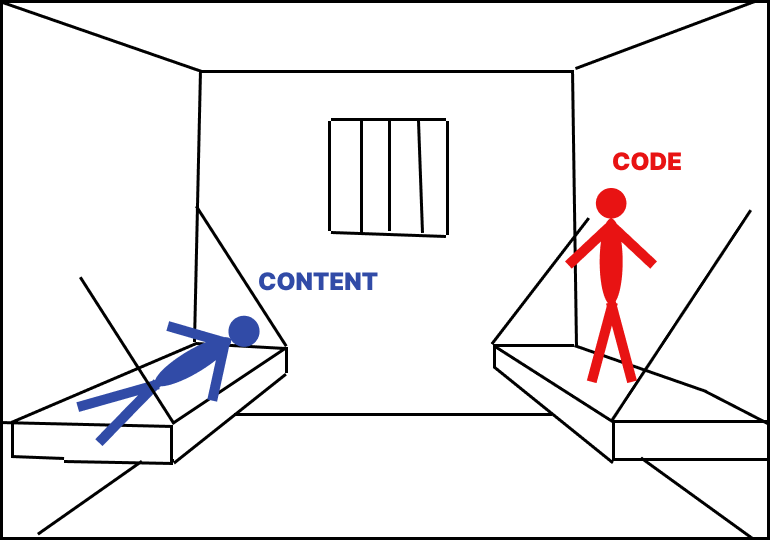
    In another post, I compared every web page to a jail cell with two prisoners: paralyzed and harmless content, and unpredictable and dangerous code.

    Because content on the Web is locked inside those jail cells, we can’t do certain things with it: annotate, combine, or create visible connections between pages. Even something as basic as saving a page often doesn’t work properly.

    The Solution: New Data Formats

    We need a web page format that contains HTML but is inherently incapable of containing scripts. A format like that wouldn’t need a jail cell. We’d be free to do all those things—annotations, content combinations, connections—that are currently impossible.

    I proposed such a format, along with two other formats. I call the new format for text-based web pages HDOC.

    But a new data format alone isn’t enough. If all we do is introduce it, we’re just creating a separate, smaller Web next to the existing one. Imagine the massive, entrenched Web—let’s call it Web 2. And next to it, a tiny Web 1.

    If Web 1 is small and separate, how popular will it become? Will mainstream browsers ever support it? Some people—educators, for example—might use it for specific projects, like interactive parallel histories with visible connections. They’d publish materials on their websites, and students could access them using specialized software.

    That’s fine. But it still leaves most content locked inside existing websites. Can we also free that content, instead of just creating new content in the new format?

    Getting content out of the jail

    Here’s the key insight: The jail of Web 2 is your browser. It starts empty. You request a web page, and your browser downloads it and locks it up.

    But the content itself doesn’t live in that jail. It lives on a server.

    Most web pages today are dynamic, meaning they don’t exist as standalone files. They’re generated on demand, pulling content from a database. That content is stored separately from the code, and separately from navigation elements that we don’t need on Web 1.1, like headers, footers, and menus.

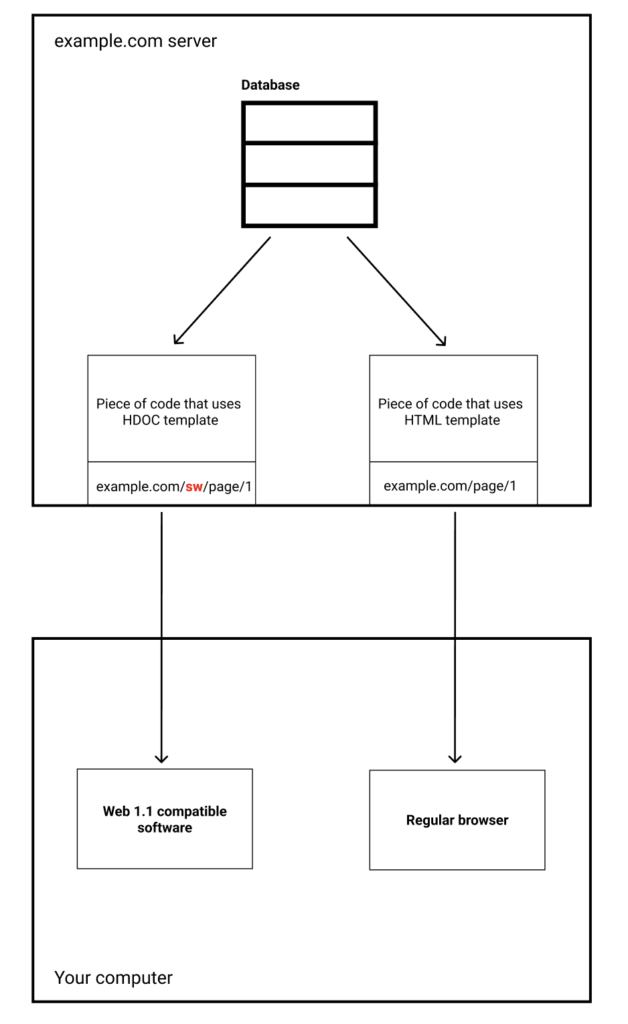
    So, getting content into HDOC format is easy: we just need a piece of code on the server that creates an additional endpoint for each page. It takes the same content from the database the original page would use, wraps it in an HDOC template, and sends it to the client.

    Adapting servers for Web 1.1

    How do we get this code on all servers? It’s a gradual process. Only website owners can do it. 

    For WordPress sites, I developed a plugin. Install it, configure it, and every page on your site will have a static version. Original page will have a download link.

    For other content management systems, similar plugins need to be developed.

    For custom-built sites, the owner would have to implement a custom solution—but it’s not hard. Just extract the data from the database and wrap it in the HDOC template.

    If a website consists of standalone HTML files, the only way to adapt it for Web 1.1 is to generate a static HDOC version of each file. Fortunately, such websites usually have only a few pages, so this process is often straightforward.

    What About Web Apps?

    Some websites act more like apps—think social networks. They don’t just serve up pre-built pages; they send you code that builds the page in real-time inside your browser.

    That doesn’t work in Web 1.1, where code is not allowed on the client. So, these sites would need to modify their infrastructure, adding server-side code and possibly extra servers to generate static versions of their pages.

    For social networks, the extra server load will be relatively small. Think about how many tweets you scroll past before finding one worth saving—that difference can be orders of magnitude.

    Supporting the Static Web (Web 1.1) will come at virtually no cost for large websites and, for many small sites, it will be completely free.

    Incentives

    Will people actually start adding the necessary code to their websites? I believe everyone has a reason to do so. It might be difficult to explain at first, but once momentum builds, Web 1.1 adoption could grow exponentially—effectively duplicating the entire Web. I delve deeper into incentives in another post.

    Conclusion

    If enough websites adopt HDOCs, it won’t just be a small parallel web. It will start unlocking the content that’s currently trapped in Web 2. And once that happens, new ways of using the Web—annotations, recombination, richer interconnections—will become possible all over the Web.

  • A New Interface for Computers

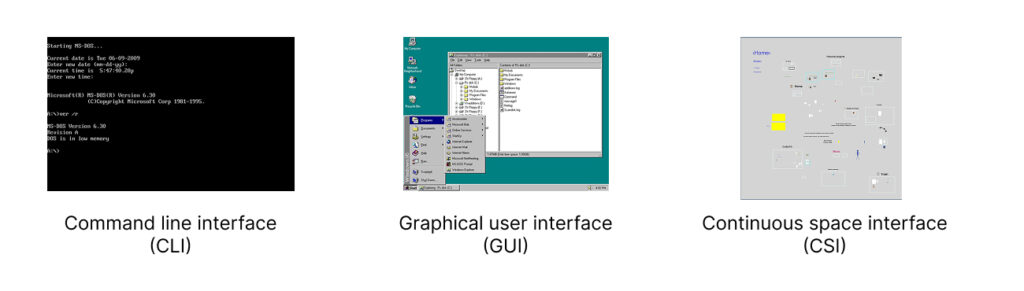
    For a long time, there have been only two main ways to interact with a computer screen: command-line interface (CLI) and desktop-based graphical user interface (GUI). I came up with the third one. I call it continuous space Interface (CSI).

    What is wrong with desktop-based interface?

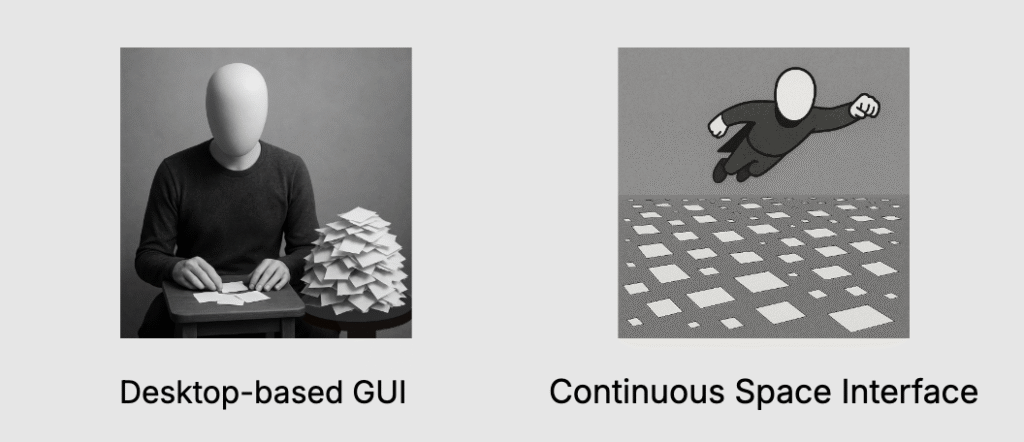
    Have you ever noticed how awkward it is to navigate your computer? First of all, you don’t have enough space. The size of your screen determines how much working space you have.

    Everything is crammed into sliding windows that constantly overlap. If you want to view one thing, you have to push something else out of the way. Or you stack windows on top of each other, creating a mess.

    Because there is always not enough space, everything is dense. Whenever you need to make a choice, you always have to choose out of 100 items.

    • Need to open an app? Here is a list of your 100 apps.
    • Need to use a bookmark? Here are 100 bookmarks to choose from.
    • Need to find a note? There are countless notes, so you have to use search.

    Windows are constantly shifting relative to each other, making it hard to orient yourself. Every time you need to switch contexts, you have to pause and think, How do I get there?

    The only thing that remains somewhat stable is the folder hierarchy—which is a nightmare of its own. Humans didn’t evolve to navigate tree structures. It’s an unnatural, abstract way to organize information.

    Also, why do we still have to name every file we save? In the real world, you don’t label every piece of paper you set on your desk.

    Imposed hierarchies

    Apps impose hierarchies that you may not want to use. For example, you may have a certain project in mind. There are things on your computer that belong to that project, like bookmarks, notes, files, etc. But where are they? They are all over the place.

    • Bookmarks live in your browser, buried among bookmarks from unrelated projects.
    • Notes are trapped in your note taking app.
    • Files are hidden somewhere in a folder maze.

    Each time you need something, you’re forced to either sift through 100 options or rely on search.

    How did we get here?

    A lot of these design choices were made when computers were primitive by today’s standards.

    • Hierarchical directories? Invented before computers even had screens.
    • Desktop-based GUI? Developed in the ’70s, when it made sense given the limitations of the time.

    Back then, these ideas were practical. Today, they’re just outdated traditions.

    We now have computers powerful enough to render entire 3D worlds in real-time—yet we’re still clinging to outdated design principles like folder hierarchies. Instead of designing interfaces that work for us, we keep making things convenient for the computer.

    The solution. Continuous space interface

    You know what’s easy to navigate? The real world.

    In the real world, you don’t shuffle through sliding windows—you place things in space. Related objects are positioned closer together. You don’t need search bars or hierarchical menus to find your stuff. You just know where things are because of spatial memory.

    So why don’t computers work the same way?

    They can. We already build immersive digital spaces in video games. Imagine an operating system designed like that. Instead of staring at a cluttered desktop, you’d enter a spatial environment—a 2D or 3D space where your data isn’t locked inside folders but arranged visually, like objects in a room.

    No more sliding windows—just move through your workspace instead of rearranging it.

    No more file names—just like objects in real life don’t need labels, your digital documents can be identified by their location in space.

    No more rigid hierarchies—just arrange things in a way that makes sense to you.

    You may think that such navigation will be too slow. But in reality it will be like playing a video game on a God mode. There will be all sorts of navigational tricks and shortcuts that will make you navigation super fast while keeping it continuous. You want to avoid ‘teleportations’ or instant changes in your environment that disorient you.

    No imposed hierarchies

    In a spatial interface, you control the organization.

    Say you’re working on a project. Instead of digging through separate apps, you could have everything—notes, bookmarks, images—right there in one space.

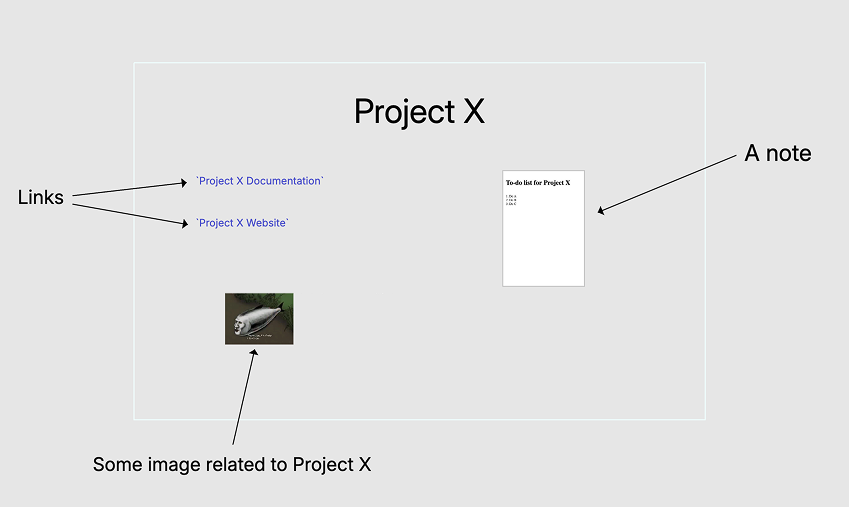
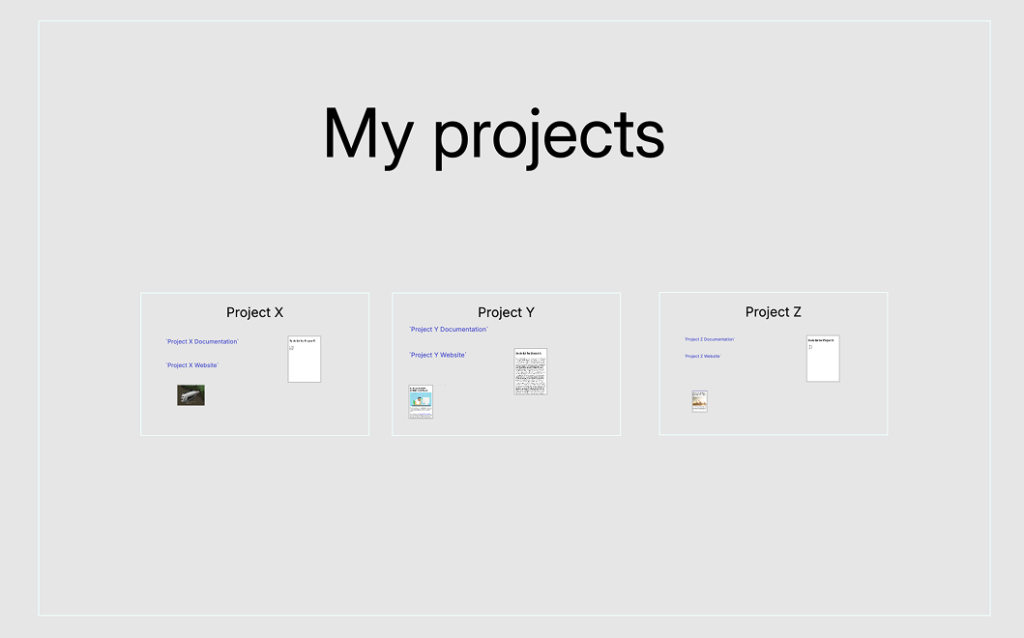
    Imagine a simple rectangle representing your project. Inside, you place everything related to it. No more choosing between 100 options or relying on search. Instead, your choices are always visually and spatially obvious.

    You can organize your projects the same way, by placing related projects closer together.

    This may remind you of folder hierarchies. But this is a hierarchy that you create. Not something inconvenient that is imposed upon you.

    Here is an example of a 3D interface:

    How to implement Continuous Space Interface

    We don’t need to build an entirely new operating system from scratch. Instead, we can start with an app. While a dedicated OS might be useful in the future, the best way forward is to test the concept in a more controlled way first.

    We can also define a limited scope to begin with. The app could handle essential elements like:

    • Text documents
    • Images
    • Links
    • File shortcuts
    • Lines and arrows

    More features can be added later. Do we need spreadsheets? Maybe—but it’s not necessary to include everything from the start.

    LZ Desktop

    I’ve already built an early version of this concept. I call it LZ Desktop (Large Zoomable Desktop). It’s far from finished, but I released it anyway—because it’s the first step toward building a new kind of web, which I discuss in other posts.

    As I continue to improve the app, others can start creating content in new formats that currently only this app understands.

    Here is a short video demonstrating some features of this app:

    You can download the app here.

    How I came up with this idea

    I wouldn’t have realized there was something fundamentally wrong with computers if not for Ted Nelson. He started designing interfaces for computer screens before computers even had screens, imagining a world where computers would connect and interlink information seamlessly.

    The way I understand his vision, connectivity was meant to be the core feature of computers. You should be able to link and combine pieces of content from different places—whether on your local system or across the network. Instead of isolated files and rigid structures, everything would flow together.

    But his ideas didn’t prevail. Instead, computers and the web became highly containerized. Everything is locked inside a box—a file is a container, a web page is a container, an app is a container. The seamless connectivity Nelson envisioned was thrown away, all in the name of security and scalability.

    I believe connectivity is too important to sacrifice. There are other ways to ensure security without isolating everything into silos. As for scalability, you don’t need to scale everything. The most common actions people take on computers—writing, linking, saving information—could be standardized, eliminating unnecessary variations in how different apps handle the same tasks. There’s no need for every application to reinvent how text is processed or how links are created.

    Instead of forcing users to navigate a maze of folders and incompatible tools, we could create an environment where these fundamental actions work seamlessly across the system. For more specialized cases, containers can still be used, but they shouldn’t be the default for everything. 

    Post scriptum

    At first glance, this post might seem off-topic for this website, which is focused on transforming the Web rather than computer interfaces in general. But the Continuous Space Interface is deeply connected to that transformation. It doesn’t need to become mainstream to have an impact—its mere existence can set off a chain reaction that pushes the Web toward new formats and interactions. But that’s a topic for another post, and this one is long enough already.

  • Web’s biggest problem. Introduction to Web 1.1

    Since writing this post, I’ve changed my views on the topic. I’ll keep it here for reference, but if you’re interested in my updated thoughts, check out the follow-up: Revisiting the Web’s Biggest Problem.

    The World Wide Web started as a web of documents. That was back in the early ’90s. Web pages were static HTML documents—simple, read-only pages that just presented information. There was no interactivity. Then, in 1995, JavaScript was added to browsers, changing everything.

    When you add a script to a web page, the page has to become a container. You don’t want the code on a page to access your file system, for example. You don’t want it making unauthorized requests to other servers. So, browsers imposed all sorts of restrictions to keep code in check. But in doing so, they also locked up content.

    The Web as a Jail

    Imagine each page in your browser as a jail cell. Inside every cell, there are two prisoners: content and code. Content is like a disabled person—paralyzed. It consists of text and images, which just sit there passively. It’s harmless.

    Code, on the other hand, is unpredictable. You don’t know who wrote it. You downloaded it from some website, and now you have to run it on your computer. So, it’s placed in a container—a controlled environment. Each web page is its own separate container.

    Why Is This a Problem?

    Each page, being locked in its own container, becomes its own isolated universe, completely disconnected from everything else. The entire Web is now just a collection of parallel worlds with no bridges between them.

    Because of this, certain features become impossible. For example, you can’t have visible connections between pages. You can’t combine multiple documents from different websites onto a single page.

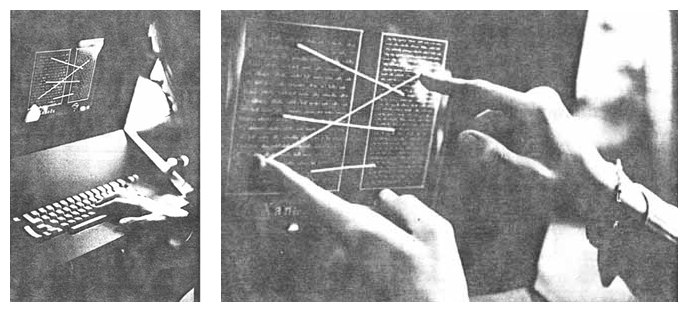
    Visible connections – a feature invented in the 1960s.
    It’s impossible to have them between regular web pages.

    You also run into all sorts of problems with saving and caching documents. Try saving a web page, and very often, the saved version appears broken. Pages today are too dependent on live server connections. If a server goes down, the content disappears.

    The Web started as a web of documents, but it was transformed into a web of containers running apps inside them. These apps often don’t function without an internet connection. They construct pages on the fly, eating up your computer’s RAM and slowing everything down. Worse, many of them track your activity and collect data on you.

    The Solution: Bring Back the Static Web

    The Web should primarily be a web of documents, with containers used sparingly. Right now, it’s the opposite—it’s a web of containers. Even if a page has no code, it doesn’t matter. It’s still in a container. Browsers treat all pages the same.

    To rebuild the Static Web, I propose three new data formats:

    • HDOC: A static equivalent of an HTML document. It uses standard HTML tags but can’t contain any scripts.
    • CDOC: A collage format that can contain images, text, lines, and other documents (including HDOCs). It’s based on SVG and is partially defined at this time.
    • SDOC: A 3D scene format that can include various document types. This is still in the conceptual phase but will be based on an existing 3D graphics format.

    All three formats are purely static and contain no executable code. This means they don’t need to be locked inside a container. You can save them on your computer, and they will always appear the same. They have no dependencies. They are as robust and enduring as Sumerian clay tablets.

    By adopting these formats, we can move back to a Web that is durable, reliable, and truly interconnected—just as it was meant to be.

    Examples

    Almost any web page can have an alternative version in the form of an HDOC. Here is what downloading an HDOC looks like:

    Here is an example of visible connections between web pages – something that is impossible on the modern Web with regular web pages:

    And in this video you can see how an HDOC can be downloaded into a 3D environment:

    Adoption of the Web 1.1

    At first, the new data formats will be used in spatial storage apps, like LZ Desktop. You will browse web as usual, using your favourite browser. Web 1.1 will help you download and spatially organise webpages on your computer.

    I wrote about stages of Web’s evolution and incentives for its adoption in other posts.

    Inspiration for the new Web

    The Web I propose—Web 1.1, or the Static Web—is heavily inspired by Ted Nelson’s project Xanadu. Ted Nelson, one of computing’s pioneers, coined the word “hypertext.” Today, we associate hypertext with HTML, but what he envisioned in the 1960s was much more ambitious.

    Modern Web links (which Nelson calls “jump-links”) are just one small part of what Xanadu aimed for. Xanadu had visible connections between documents, transclusions (where a document could include parts of another document), built-in versioning, and more.

    I’ll dive deeper into Xanadu in another post.

    Will Web 1.1 succeed?

    You may be skeptical. After all, anyone can invent a new data format. The real question is whether it will gain adoption.

    The reason I’m optimistic about Web 1.1 is that I believe I’ve identified strong incentives for website owners to start using these new formats.

    I talk about that in another post.