Introduction to Reader's Web

We only use about 50% of the capabilities of the World Wide Web. Reader's Web is the missing half of the Web that we can build. Here, I'll introduce the concept of the Reader's Web.

What is the World Wide Web?

First, let's make sure we're on the same page about what the Web actually is. A lot of people confuse the Web with the Internet, so it would probably be helpful to explain how the two differ.

The difference is simple: the Internet is a network of computers. The World Wide Web is a network of documents. Computers are connected by wires; documents are connected by hyperlinks.
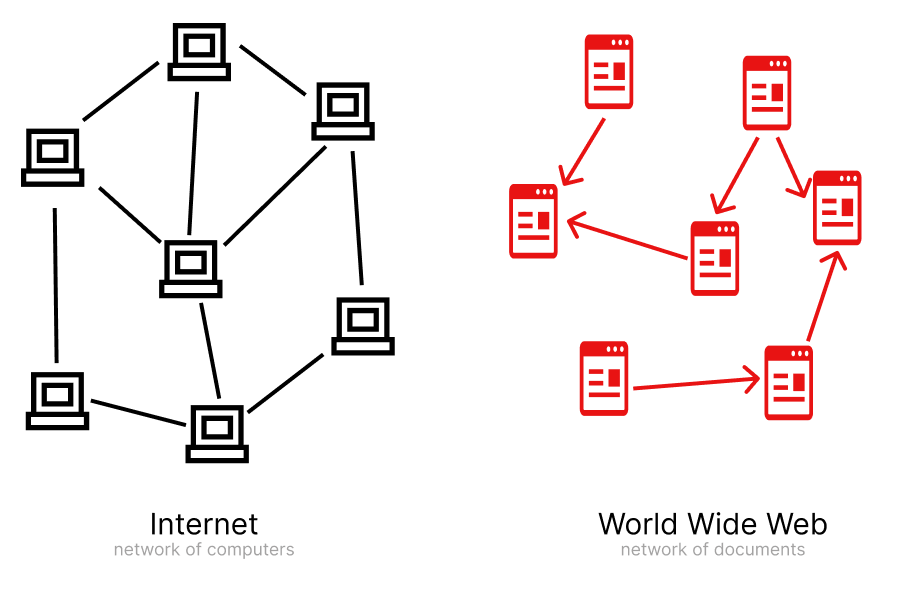
So, think of the Web as a collection of documents. Perhaps this isn't the most precise definition of the Web, but it's good enough for our purposes.

Reader's Web vs Publisher's Web

There are two possible types of web page. So far, however, we've been using only one of them.
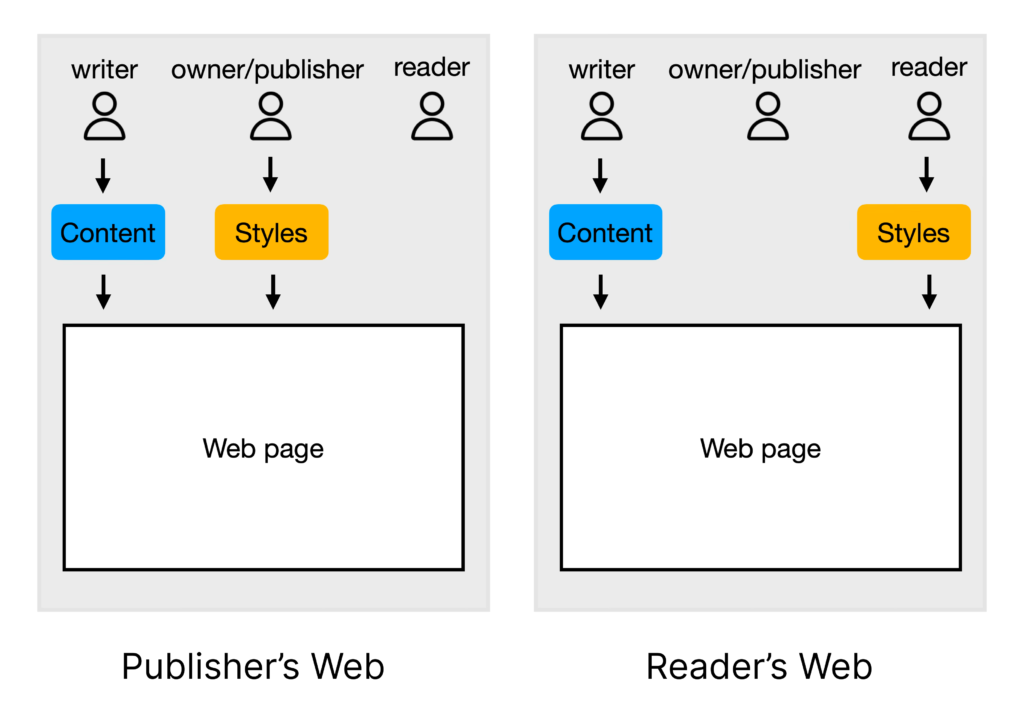
Each web page has an owner, a writer and a reader. Those are not necessarily three separate people. You can think of them as roles. Often, the person who owns a website also writes its content. In that case, they are both the owner and the writer. In other cases—for example, on social media websites—the owner is a social media company, and any user can be both a reader and a writer.

The two kinds of web page differ in who decides what the page looks like—or, in other words, who provides the styles. The content is always provided by the writer. But who provides the styles? There are only two possibilities: either the owner (publisher) or the reader.

So far, we've only had web pages whose owner provides the styles. For that reason, we can call the current Web the Publisher's Web. What I propose is that we should also build the Reader's Web, where the reader decides what a web page looks like.

Browser support is not required

Before we go any further, I want to stress that everything I'm going to talk about here is already available to us. We don't have to wait for mainstream browsers to start supporting new document types.

The most common type of web page

There is a very popular type of web page. We can call it a content page. Basically, it's a page containing an article or a blog post.

This is what it typically looks like.
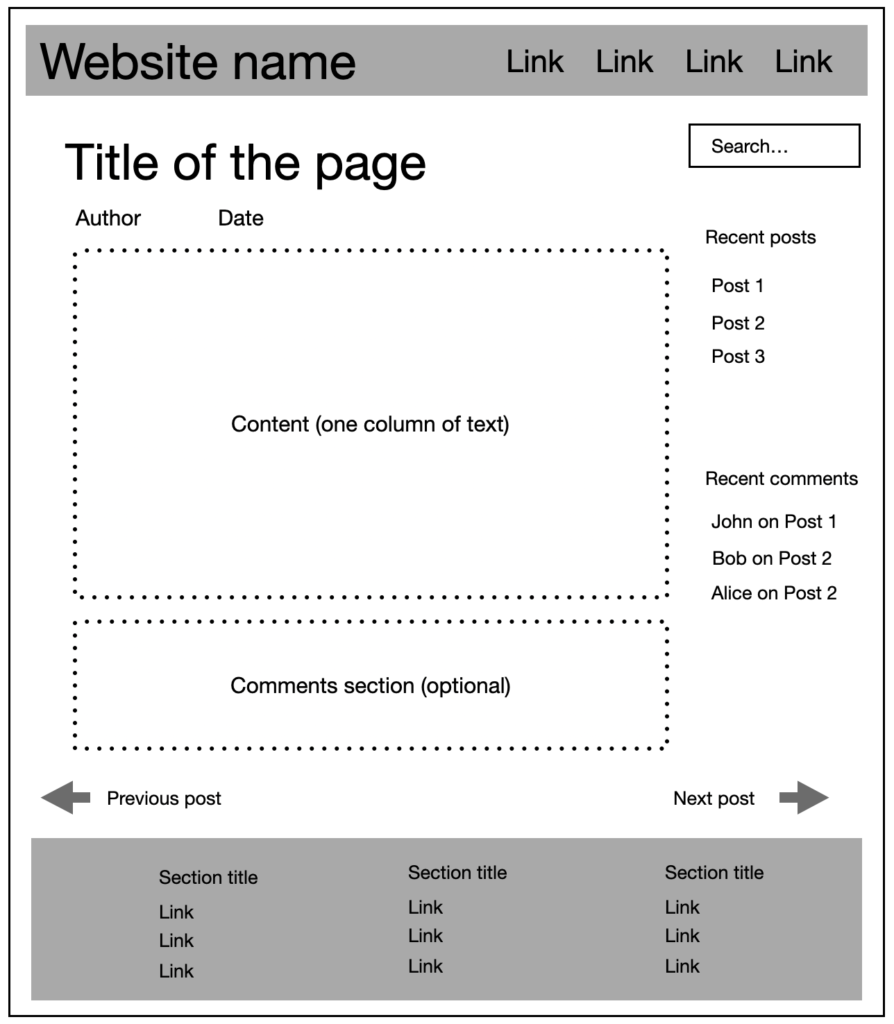
It has a title. Its content consists of a single column of text. It may have a comments section, top and bottom navigation bars, a sidebar with additional links, and so on.

How is such a page constructed? Like all other web pages: all of its content, including the navigation panels, is placed inside the <body> tag of an HTML document. Styles are then applied to it.

Another way of constructing such a page

The Reader's Web approach is to define a completely new document type. I've already done that, by the way, and the new document type is called HDOC (Hypertext Document). It is an XML-based document. The only part that contains HTML is the <content> tag, which holds the text of the article. Everything else—including the title and the links in the navigation panels—is stored in XML tags.

Why would you do it this way?

It may seem unnecessary. If we already have a universal way of constructing any kind of web page, why would we need a new, specialized way of constructing one specific type of page?

Because it gives us a couple of advantages.

  • First, as a website owner, you don't have to worry about styling your pages. You leave that up to the reader. For many bloggers, choosing a theme may be a burden. Why shouldn't you be able to skip that choice? On social networks, you don't worry about fonts and colors because they're taken care of by the platform. On the Reader's Web, you can skip that choice on your own website.
  • Second, a new kind of connection between pages become possible. Basically, you can use visible connections between pieces of text on two different documents. Here is a video showing how to use this new functionality.

Well-trodden path example

There is a concept in urban planning called a desire path. It is an unofficial path created by people walking where it is most convenient rather than where planners expected them to walk.

Sometimes, instead of trying to force people to use the paths that were designed in advance, planners observe these natural paths and build proper walkways along them.

The Web has existed for more than 35 years. During that time, people have created their own "desire paths" — patterns of how information is published, shared, and consumed. A content page is one of those patterns. It is a document with a title, text, and a predictable structure that appears again and again across millions of websites.

Standardizing this type of document is not an attempt to invent a completely new way of using the Web. It is recognizing a pattern that has already emerged and making it a first-class part of the Web.

And the infrastructure for this already exists. Typically, a web page is just a record in a database containing fields such as a title and HTML content. A relatively small change in server code can allow the same content to be delivered in a different document format.

Continuing the trend

Another way to look at Reader's Web is as a continuation of a trend that has existed throughout the history of the World Wide Web.

In the early days, many websites were highly customized. They had unique layouts, animated images, unusual navigation, and experimental designs. Over time, websites became more polished and professional, while also becoming more standardized and consistent.

Some people may regret that change, but the shift toward standardization happened for a reason. It improved usability. Readers no longer needed to learn a new interface every time they visited a different website.

If you want to experience the early Web again, you can visit sites like Neocities and browse the many vintage-inspired pages created there. They can be fun and nostalgic, but many of the design elements that once felt exciting can now become distractions from the actual content.

And now we have social networks where authors don't control presentation at all, and this model has become completely normal for millions of people.

Reader's Web continues this long-term trend by standardizing the format of a content page and moving presentation choices from individual websites to the reading environment. The author no longer needs to spend time designing every visual aspect of their website. They can focus on creating content, while readers can choose how that content is displayed.

The result is not a Web without design, but a Web where design becomes a choice made by the reader rather than a requirement imposed by every individual website.

Sub-webs

The Web is a collection of all web pages. Originally, it consisted only of HTML pages. Over time, other document types were added. For example, PDF documents. A PDF document behaves like a web page: it can be viewed in a browser, and it can contain clickable links. Another document that behaves similarly is a standalone SVG image.

HTML, PDF, and SVG documents may contain scripts, so they can behave like applications. Each of them is an isolated container. Each of them has its own styles. The reason we haven't seen visible connections on the Web so far is because you can't really draw visible connections between such pages because their styling is unpredictable.

A collection of documents of a particular type can be called a sub-web. We can talk about a "PDF sub-web" or an "SVG sub-web," although such terms are not particularly useful.

More interesting are the sub-webs we can create on the Reader's Web. I call them static sub-webs because documents on the Reader's Web are static—that is, they don't contain scripts. Currently, the Reader's Web includes the following document types:

  • HDOC (an HTML-based document containing an article)
  • CDOC (SVG-based collage document)
  • CONDOC (a connections document that allows the main document to be loaded from another URL)
  • Static comments (a JSON feed of comments that can be used in HDOCs)

In the future, other document types may be added—for example, timelines or walkable 3D scenes. You can turn almost any application into a web of documents.

What's crucial is that these documents don't contain information about how they should be styled. There may be exceptions for things like aligning an image to the left, center, or right. But the author shouldn't be able to make major layout changes. For example, an HDOC shouldn't be able to have two columns of text instead of one.

The idea is that the client application (the browser) downloads the document and applies its own styles to it. The browser may even offer multiple themes that the user can choose from. In the end, it is the reader who decides what such pages look like. Content pages (HDOCs) from all websites will share the same theme.

Recipe for creating a static sub-web

Anybody can create sub-webs. The question is: once you create a new document type, how do you get browsers to support it? It turns out that you don't have to.

There is a way to introduce a new document type and popularize it on the Web without browsers explicitly supporting it. If it becomes popular enough, browsers may eventually start supporting it directly. But that support is not strictly necessary for the document type to be useful.

Let me explain how it can be done. I'll use HDOC as an example.

Step 1. Define the document type

Define the new document type as if you expect browsers to support it. Now you have the document, but browsers don't know how to render it.

Step 2. Create a client app

Create a client application—preferably a browser extension. You could create your own browser, but it's much easier to create an extension focused on supporting the new document type while letting the existing browser handle everything else. It's also easier to convince people to install an extension than to switch to a new browser.

Now people with the extension can view HDOCs. The problem is that they are a tiny minority of all browser users. Most people don't have the extension installed, so when they open an HDOC they'll only see its source code. What's worse, website owners will be reluctant to publish such documents because they won't be readable for most visitors.

Step 3. Define an embedded version

Define an additional, hybrid version of the document. I call it an Embedded HDOC because it is embedded in a normal HTML page.

Of course, you don't simply add an entire HDOC containing the same content to an existing HTML page. Instead, you annotate the content of the HTML page and store all the additional information in JSON format. This allows the same URL to serve both formats. People with the extension installed will see an HDOC. Everybody else will see the original HTML page.

So, we no longer have pages that appear as raw source code to most people.

That leaves only one problem. If you, as a website owner, use new features such as visible connections, they'll be available only to people who have installed the extension. That means you'd have to tell your readers something like:

"To see the visible connections on this page, you need to install this browser extension."

For many website owners, that may be a deal breaker.

Step 4. Serve Reader UI from your server

Instead of relying solely on the browser extension, websites can serve the Reader UI themselves. This way, everyone gets the full functionality without being asked to install additional software.

Such a page should also contain an Embedded HDOC in case someone wants to use the extension or load the page as a connected document next to another document.

In the end, all you need is a browser extension and some server-side code.

For HDOCs, the extension can be downloaded here. As for the server-side code, I've developed a WordPress plugin that you can find here.

Circumventing browser restrictions

On the Reader's Web, you can connect pages to other pages and display visible connections between specific parts of their content. That means the main page must be able to request the connected page.

If the connected page is hosted on another website, you can't request it directly because browsers block such cross-origin requests. There are a couple of ways to work around that restriction.

With the browser extension, you route the request through a background script. The background script is exempt from the browser's cross-origin restrictions. You do, however, need to take measures to prevent a malicious web page from hijacking the background script which I have already done in my extension.

When the Reader UI is served from the server and the extension is not used, you can instead use a proxy endpoint to forward requests to other websites.

In that case, you need to make sure that other people can't use your endpoint as a tunnel to request arbitrary URLs. In my plugin, the frontend sends not only the target URL but also the URL of the current page. The server then checks whether the current page lists the target URL among its outgoing connections. Only if it does is the request forwarded to the other website.

Is it safe?

Circumventing browser restrictions may seem dangerous. After all, those restrictions exist for a reason.

But in this case, it is perfectly safe.

Browsers block cross-origin requests because they need to protect you from the code that comes with a web page. That code is written by unknown authors and can't be trusted to make requests to other servers on your behalf.

An HDOC, however, contains no scripts. The code that runs the Reader UI is trusted code. Today, that's the browser extension. In the future, it could be built directly into the browser.

Server plugin

Some document types, such as HDOC and Embedded HDOC, can be created manually and published as files on any website. However, to simplify the adoption of new document formats, server plugins can be used. Currently, there is only one such plugin for WordPress sites, called Static Web Publisher. It supports four document formats.

There are actually two kinds of Embedded HDOC: forced and regular.

A forced Embedded HDOC means that if you open the document with the browser extension installed, you'll see it in the HDOC layout. This allows website owners to "sit on the fence" by leaving the choice of document format to the user. If the user has the extension installed, they see the HDOC. Otherwise, they see the original HTML page.

A regular Embedded HDOC can be used on landing pages where the website owner always wants the page to be presented as HTML with its custom styling preserved.

So what's the point of embedding HDOC information in such a page?

The idea is that these documents are presented as HDOCs only when they are loaded as connected documents on the right side of the screen. This allows anyone to connect to such a document without having to define parsing rules.

In the future, once mainstream browsers support these document formats natively, forced Embedded HDOCs will be replaced by standalone HDOCs.

Everybody gets what they want

This approach gives everyone exactly what they need.

A reader only has to install the browser extension to get the full Reader's Web experience, including the ability to configure the theme for all static documents.

A website owner who uses visible connections wants to be sure that everyone will see those connections, regardless of whether they have the browser extension installed. Serving the Reader UI from the server makes that possible.

And if a website owner simply likes the main idea of the Reader's Web and wants to delegate the choice of the website's theme to the reader, they can enable an option in the Reader UI that displays an informational popup explaining the Reader's Web. Readers who find the idea interesting can then install the extension.

To readers who aren't familiar with the Reader's Web, it will simply look as though many unrelated websites happen to use the same theme. Until browsers start supporting the Reader's Web natively, you have to use some theme on your website whether you like it or not.

Who can create static sub-webs?

Because browser support is not required, anybody can define new document types and use the above "recipe" to create static sub-webs.

You can turn any app into a web of documents. Take for example this web app that shows historical events on an interactive timeline. Here is a video that shows the timeline in action.

The timeline, with its navigation, can be moved to a browser extension and a server plugin. A couple of web page document types can be defined for folders and layers of historical events. Currently, that information comes from the website's database, but it can come from documents published on many different websites.

And you can do so with almost any app. You just need to find a use case where turning an app into a web of documents makes sense. We don't need to be too cautious. You can think of it as throwing things at a wall to see what sticks. Some of those document formats may become popular enough that eventually browsers may start supporting them directly. But even if that never happens, it doesn't necessarily mean that those particular document types have "failed." You can have niche sub-webs that are useful for some people but are never directly supported by browsers.

What about browser support?

While we don't require browser support for the new document formats, we actually do want browsers to start supporting them at some point in the future. It will simplify a lot of things.

For example, website owners won't need proxy endpoints to circumvent browser restrictions when downloading a connected document from another website. That will make requests much faster, and the owners of the websites you request connected pages from will see your information in their analytics instead of the proxy server's.

The browser extension won't be needed anymore.

Server-side code will be simplified because you won't need to serve the Reader UI from the server anymore.

In the future, "forced" versions of embedded documents will become obsolete as well.

In the future "forced" versions of embedded documents will become obsolete

Around the time browsers start supporting Reader's Web, content management systems like WordPress may start supporting it as well. At some point, you won't need a server plugin or any special software at all. HDOC will become a first-class citizen of the Web.

But for all of that to happen, we need all mainstream browsers to support Reader's Web. Not some of them. Not most of them. All of them. If there is a noticeable percentage of people who can't view standalone HDOCs because their browsers don't support them, website owners will not start switching to standalone HDOCs and will continue using Embedded HDOCs and the Reader UI. And for any browser company that goes through the trouble of implementing support for Reader's Web, it may seem that they have just wasted their resources on something pointless because nobody uses HDOC — the document format they have just started supporting.

So achieving native browser support of Reader's Web document formats is tricky. But the good news is that, as I said earlier, while we do want browsers to support Reader's Web, we don't need that support.

If you focus on functionality, you will see that browser support won't add any new functionality. If there is any functionality you think is missing from Reader's Web, we can add it. Browser support will make things simpler, faster, and cleaner. But it won't add any functionality that we can't add ourselves.

Problems we don't need to worry about

If you want to have a blog without having to worry about its design, or if you want to use connected documents with visible connections, it shouldn't matter to you how popular or unpopular Reader's Web currently is.

The "network effect" is not important for the adoption of Reader's Web document formats. It is important in other scenarios. For example, if you start a brand-new social media platform, you may fail to get users simply because people don't want to join an empty social network.

This is not the case with Reader's Web. For a website owner, Reader's Web is all about the new functionality it provides. And when you install all the required software, you get that functionality regardless of how many websites support Reader's Web document formats.

What we still need to work on

The problems we have are about coverage. For example, we have a WordPress plugin, but we don't have plugins for other content management systems. But that's not a conceptual problem. It's not that we don't know what to do. And it's not a problem of getting permission from big browser companies. It's just a matter of doing it.

Once I see traction with the software we currently have, I may proceed with creating new software that covers the needs of other websites, not just WordPress websites.

Useful links

Note: serving Reader UI from the server is a relatively new idea. In the older videos there is no mention of it. So, those videos may give you an impression that the entire project revolves only around the browser extension. But its no longer the case.

If you want a quick idea of what this is:

→ A 5-minute demo of visible connections:
https://www.youtube.com/watch?v=rNVB3R0yW9E

Try it yourself

→ Install the extension:
https://chromewebstore.google.com/detail/visible-connections/hlckcdbgknflkkciojgdbhomdnegimbm

→ Then explore examples here:
https://reinventingtheweb.com/explore-static-web/

Go deeper

If you want to publish visible connections on your website:

→ How to create and publish connections (30 min):
https://www.youtube.com/watch?v=hZuB7WCJPBI

If you want to understand the system in more detail:

→ Full explanation of the project (44 min):
https://www.youtube.com/watch?v=1Lm9WchLcBw

→ Ideas for the future (46 min):
https://www.youtube.com/watch?v=uFtwsFuMNVw

Floating links were modified